
On average, field sales reps spend only 28% of their week actually selling while the rest gets burned on drive time, admin work, and figuring out who to visit next. If you’re managing a team spread across territories, you’ve felt that pain—unbalanced workloads, wasted windshield time, and zero visibility into what’s happening in the field.
Salesforce Maps promises to fix that with location intelligence built directly into your CRM. It visualizes your accounts on a map, optimizes routes, and helps you carve territories that actually make sense. But at $75-150/user/month on top of your Salesforce subscription, you need to know if it’s the right fit for your team—or if there’s a better option.
This guide breaks down exactly what Salesforce Maps does, what it costs, and when you should consider purpose-built field sales alternatives like SPOTIO.
What Is Salesforce Maps?
Salesforce Maps is a location intelligence add-on that embeds mapping and territory management capabilities directly into Salesforce CRM. Originally launched as MapAnything before Salesforce acquired it in 2019, the platform helps sales and field service teams visualize customer data geographically, plan optimized routes, and design balanced territories.
The tool targets enterprise Salesforce customers who need to manage complex field operations—think sales teams with 20-100+ reps, field service organizations dispatching technicians, or marketing teams running location-based campaigns. Since it’s native to Salesforce, all your CRM data flows seamlessly into the mapping interface without exporting spreadsheets or switching between systems.
How Salesforce Maps Works
Salesforce Maps pulls address data from your Salesforce records—accounts, leads, contacts, custom objects—and plots them as pins on an interactive map. You can layer different data sets on top of each other (accounts, opportunities, service tickets), draw boundaries around territories, and run calculations on everything within those areas.
The system uses geocoding to convert addresses into map coordinates, then lets you filter, segment, and visualize that data in ways spreadsheets never could. Reps access optimized routes through the mobile app while managers use the desktop version to design territories and analyze performance across regions.
Core Salesforce Maps Features
Territory Planning & Management
Salesforce Maps helps you design fair, balanced territories based on geography, workload, rep skill level, and revenue potential. The territory planning engine factors in more than just zip codes—you can balance by account count, revenue opportunity, travel time, or rep capacity to avoid overloading your top performers while leaving others idle.
The 2022 Territory Planning update added digital selling flexibility, letting you overlay territory plans and adjust for hybrid or fully remote sales teams. You can also align related territories (like pairing sales reps with solution engineers) to improve collaboration and hand-offs between roles.
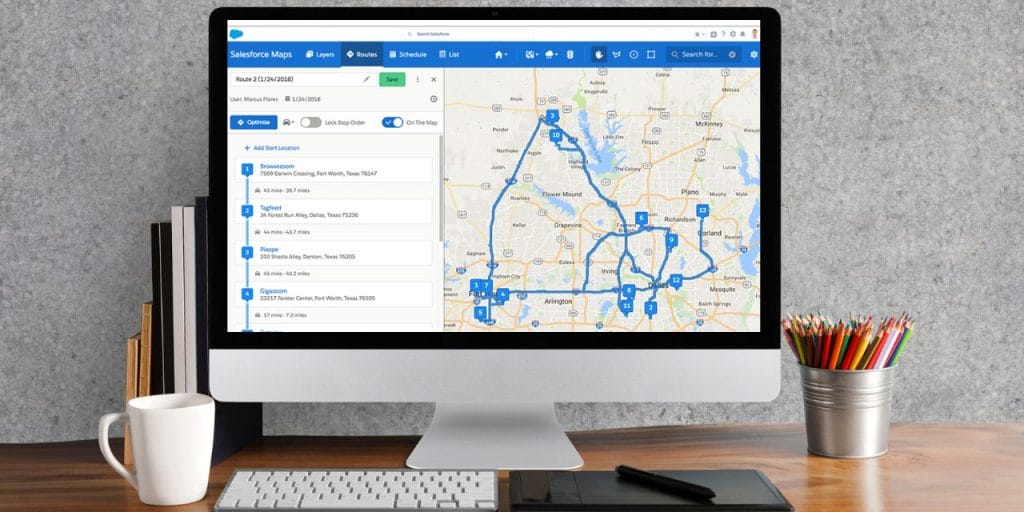
Route Optimization & Scheduling
The platform calculates optimized multi-stop routes based on distance, travel time, and appointment priority. Basic plans allow route optimization and scheduling for single-week planning windows, while Advanced plans extend that to quarterly route planning horizons.
Routes factor in time windows, priority accounts, and can auto-assign leads to the closest available rep based on territory rules. Sales reps see their daily schedule synced with calendars and can navigate to each stop—though Salesforce Maps itself doesn’t provide turn-by-turn navigation; it hands off to Google Maps or other apps.
Live Location Tracking
Salesforce Maps offers visibility into field team locations and activities through check-ins and geo-fencing. Managers can track equipment location, monitor time on site, and identify traffic or safety issues that impact productivity. The system auto-logs customer visits when reps enter geo-fenced areas, updating CRM records automatically.
Layers & Data Visualization
Layers let you toggle different data sets on and off the map interface—plot accounts on one layer, open opportunities on another, service cases on a third. Each layer can be customized with different marker colors, sizes, and icons to visually distinguish between account types, priority levels, or deal stages.
You can save custom layer configurations and share them across teams, making it easy for everyone to see the same data view during territory reviews or planning sessions.
Geocoding & Boundaries
The platform includes batch geocoding to validate and convert addresses into map coordinates. You can draw custom boundaries using circles (radius-based), polygons (custom shapes), or drive-time zones (everything within 30 minutes of a location) to define territories or analyze market coverage.
Boundaries help identify which accounts fall within each rep’s territory and calculate aggregate data for everything inside those areas.
Aggregate Data Analysis
Calculate sums, averages, minimums, maximums, or counts for any field within a drawn boundary. For example, find the average deal size of all opportunities in a territory, total annual revenue across a region, or count how many prospects fall within a 15-mile radius of an event venue.
This feature turns geographic areas into reportable segments, helping you spot high-value pockets or underserved markets worth targeting.
Mass Actions & Bulk Updates
Once you’ve drawn a boundary and selected records within it, you can take bulk actions across all of them at once. Add hundreds of prospects to a marketing campaign, assign multiple accounts to a new route, or follow them all on Chatter without touching each record individually.
Mass actions save hours of manual data work when you’re reassigning territories, launching regional campaigns, or updating field data across large account sets.
Custom Maps & Visualizations
Thematic mapping (available in Advanced plans) overlays external data sources like demographic information, competitor locations, or economic indicators onto your Salesforce data. Create heat maps showing revenue concentration, customize map styles with your brand colors, and build dashboard views that executives can actually understand.
You can save multiple map configurations for different use cases—one for prospecting, another for territory planning, a third for executive reviews.
Salesforce Maps Pricing Breakdown
Salesforce Maps comes in two tiers, both billed annually.
Basic Plan: $75/User/Month
The Basic plan includes:
- Route optimization and scheduling (one week at a time)
- Salesforce data visualization on maps
- Auto-assignment of leads based on location
- Mobile app access
- Standard marker layers and boundaries
This tier works for sales teams that need straightforward route planning and territory visualization without complex analytics or long-term scheduling.appexchange.salesforce+2
Advanced Plan: $125-150/User/Month
Pricing note: Official Salesforce documentation shows Advanced pricing at $150/user/month, though some third-party sources still reference the older $125 price point. Always verify current pricing directly with Salesforce.
Advanced adds:
- Priority scheduling with business rules and constraints
- Thematic mapping and territory layers with external data
- Route planning horizon up to one quarter
- Advanced geo-analytics and rep management tools
This tier suits sales operations teams managing complex territories across multiple regions, or organizations that need demographic overlays and predictive analytics.
Hidden Costs to Consider
Salesforce CRM requirement: You can’t use Salesforce Maps without an active Salesforce subscription. That adds $75-300+/user/month depending on your CRM edition (Professional, Enterprise, or Unlimited). Maps isn’t available on the Essentials tier.
Implementation and setup: Salesforce Maps requires significant admin configuration—territory rules, geocoding setup, layer customization, integration with calendars. Budget for consulting hours or plan on your sales ops team spending weeks getting it production-ready.
Geocoding API limits: Heavy usage may trigger additional geocoding fees beyond included quotas.
Training time: The platform has a steep learning curve, especially for sales reps who aren’t tech-savvy. Plan for multiple training sessions and ongoing support.
Total cost comparison including CRM requirements:
| Tier | Price | Route Planning Window | Best For |
|---|---|---|---|
| Basic | $75/user/month | 1 week | Small teams, basic routing needs |
| Advanced | $150/user/month | 1 quarter | Sales ops, complex territories, analytics |
| Total Cost | +$75-300/month CRM | Varies | Factor in full Salesforce subscription |
Benefits for Field Sales Teams
Cut Wasted Drive Time
Optimized routing reduces windshield time by 20-30%, letting reps fit more meetings into each day. Instead of zigzagging across territories or backtracking to missed accounts, reps follow routes that minimize travel and maximize face-time.
Balance Territory Workloads
Visual territory design helps you spot imbalances before they kill morale. When one rep is drowning in 200 accounts while another coasts with 75, you can see it on the map and rebalance based on revenue potential, account density, or travel time—not just geography.
Make Data-Driven Territory Decisions
Aggregate data calculations show you which territories are underperforming, where your highest-value accounts cluster, and which markets have untapped potential. You can layer opportunity data over account locations to see which reps have the best pipeline coverage and which need help.
Improve Customer Coverage
Geo-fenced auto-logging ensures every customer visit gets recorded, even when reps forget to update the CRM. Managers finally get accurate activity data showing who’s actually working their territory versus who’s hiding behind excuses.ppl-ai-file-upload.
Automate Lead Assignment
Location-based lead routing sends new prospects to the closest available rep instantly. No more manual assignment, no more leads sitting unworked because nobody knew who owned that zip code.
Common Salesforce Maps Challenges
Steep Learning Curve
Salesforce Maps ispowerful but complex. Sales managers and ops teams face weeks of configuration before the platform works properly. Reps struggle with the mobile interface, especially if they’re not already comfortable navigating Salesforce’s ecosystem. Budget extra time for training and expect adoption friction.
How to overcome it: Roll out in phases—start with basic route optimization for a pilot team, then expand to full territory planning once they’re comfortable. Dedicate a Salesforce admin to own the implementation and provide ongoing rep support.
Expensive for Mid-Market Teams
At $75-150/user/month plus your Salesforce subscription, the total cost hits $150-450+/user/month. For a 20-person team, that’s $36,000-108,000 annually just for mapping capabilities.
How to overcome it: Calculate ROI carefully—how many extra meetings per day does each rep need to close to cover the cost? If your team’s average deal size and close rate don’t support it, explore dedicated field sales platforms built for tighter budgets.
Salesforce-Only Limitation
Salesforce Maps only works with Salesforce CRM. If you use HubSpot, Pipedrive, Zoho, or another CRM, you’re out of luck. Even companies considering a CRM switch face the risk of losing their entire mapping investment if they ever migrate away from Salesforce.
How to overcome it: If you’re locked into Salesforce long-term, this isn’t an issue. But if you’re a growing company that might outgrow your CRM or want flexibility to switch vendors, consider CRM-agnostic mapping tools with broader integration options.
Mobile App Limitations
The mobile version lacks features available on desktop, forcing reps to complete certain tasks back in the office. Route adjustments for cancellations or last-minute appointments aren’t as intuitive, and the interface feels clunky compared to consumer mapping apps reps use daily.salesforce
How to overcome it: Set clear expectations about what reps can and can’t do from their phones. For time-sensitive route changes, have them call dispatch or use a workaround until they’re back at a computer.
Salesforce Maps Best Practices
Start with clean CRM data. Garbage addresses produce garbage routes. Run a data hygiene project before implementing Salesforce Maps—standardize address formats, fix missing zip codes, and geocode your entire database.
Build territory rules around revenue potential, not just geography. Balance territories by opportunity value, account density, and rep capacity. A geographically small territory in a dense urban area might generate more revenue than a sprawling rural territory covering three states.
Train reps on mobile before full rollout. Give them a week to practice with dummy data before pushing live routes to their phones. Reps resist tools that slow them down—early training prevents adoption problems later.
Set up automated lead assignment rules. Configure location-based routing to auto-assign incoming leads to the closest rep within seconds. Speed-to-lead matters, and manual assignment kills your response time.salesforce
Review territory performance monthly. Use aggregate data features to spot underperforming territories, coverage gaps, or markets that need reinforcement. Rebalance quarterly based on what the data shows, not rep complaints.ppl-ai-file-upload.
Integrate with calendars for seamless scheduling. Sync Salesforce Maps routes with Outlook or Google Calendar so reps see their day in one place. When appointments change, make sure updates flow both directions to avoid double-bookings.
Looking Beyond Salesforce Maps?
Many Salesforce customers choose SPOTIO over Salesforce Maps because it delivers superior mobile experience, faster adoption, and field-specific features while maintaining seamless Salesforce integration. Whether you’re running Salesforce, HubSpot, or another CRM—or need a standalone platform—SPOTIO gives field teams the tools they actually use to drive revenue.
SPOTIO integrates directly with Salesforce to deliver territory management, rep activity tracking, and task automation in a mobile-first platform designed for field sales. It gives Salesforce teams more selling time, easier workflows, and richer visibility than Salesforce Maps, while keeping all activity in sync with your existing CRM.
Learn more about how SPOTIO compares to Salesforce Maps or explore other Salesforce Maps alternatives.
SPOTIO: Built for Field Sales Teams
Best For: Field sales teams from 5 to 500+ reps across B2B and B2C industries including telecommunications, financial services, construction, distribution, roofing, and home services.
SPOTIO is afield sales engagement platform designed for outside sales teams who need mobile-first tools that reps actually use. Unlike Salesforce Maps, which requires a full Salesforce CRM subscription and admin-heavy configuration, SPOTIO works standalone or integrates with your existing CRM.
Key Capabilities:
One-tap activity logging: Reps log customer interactions, door knocks, presentations, and outcomes with a single tap while standing at the door—no typing, no forms, no friction.
Download My Day offline functionality: Pre-download your scheduled stops and account data for the day to work offline for up to 24 hours. Data syncs automatically when you’re back online.
Route planning with Google Maps navigation: SPOTIO calculates optimal routes based on your priorities, then hands off to Google Maps or Waze for turn-by-turn navigation.
Prospect Discovery: Tap businesses on a map to pull contact info from Google Places for B2B prospecting. For B2C residential, Lead Machine provides 15 data points including homeowner name, property value, and demographics.
AutoPlays for follow-up sequences: Enroll prospects in multi-touch sequences that guide reps through next actions—calls, emails, site visits. Reps manually enroll prospects and SPOTIO prompts them on the next step in the sequence to keep deals moving forward.
Real-time CRM sync: Seamless, bi-directional integration with Salesforce, HubSpot, and other major CRMs means data flows instantly between systems with no delays or manual exports.
SPOTIO AI knowledge assistant: Reps get instant access to product specs, pricing sheets, messaging templates, and step-by-step platform guidance through an AI-powered assistant. Perfect for onboarding new reps or refreshing veterans on new products.
Enterprise-grade security & scalability: SOC2 Type II certified with SSO, role-based permissions, and proven scalability from 5-rep startups to 500+ rep enterprises. Rapid onboarding gets teams productive in days, not months, with dedicated customer success support.
Price-to-Value Comparison
| Factor | Salesforce Maps | SPOTIO |
|---|---|---|
| Starting Price | $75/user/month | Custom pricing |
| Total Cost | +$75-300/month CRM subscription | Standalone or integrate with existing CRM |
| Requires Specific CRM | Yes (Salesforce only) | No (works with Salesforce, HubSpot, Pipedrive, others) |
| Implementation Timeline | Weeks to months (admin-heavy) | Days to weeks (quick setup) |
| Mobile Experience | Desktop-focused, limited mobile | Mobile-first, built for field use |
| Best For | Enterprise Salesforce customers with complex territories | Field sales teams (5-500+ reps) prioritizing mobile experience, rapid adoption, and rep productivity—works seamlessly with Salesforce or standalone |
| Route Planning | Basic: 1 week, Advanced: 1 quarter | Flexible daily/weekly planning |
| Offline Capability | Limited | Download My Day feature (24 hours offline) |
When to Choose Salesforce Maps
- You need advanced geo-analytics with external demographic data overlays and thematic mapping capabilities
- Your sales ops team wants to build everything natively within Salesforce (and has capacity for weeks of custom configuration)
- You value Einstein AI forecasting and opportunity scoring over mobile-first field experience
- Desktop/browser-based workflow is acceptable for your field reps
- Budget supports $150-450+/user/month total cost
When to Choose SPOTIO
- You’re a Salesforce customer who wants better mobile experience and field-specific features than Maps provides.
- You need faster implementation and adoption: days/weeks vs months, with reps productive immediately.
- Your reps work primarily from their phones and need true offline capability (Download My Day feature).
- You want one-tap activity logging, AutoPlays for follow-up automation, and tools reps actually use daily—not desktop-focused interfaces.
- You need enterprise-grade security (SOC2, SSO, role-based permissions) with flexible CRM integration.
- You want superior verified ratings: SPOTIO beats Salesforce Maps in 8 of 9 G2 categories including ease of setup (9.1 vs 7.9), ease of use (8.8 vs 8.1), and map design (9.7 vs 8.5).
- Budget matters: $150-450+/user/month for Salesforce Maps is cost-prohibitive for your team.
- You want proven results: SPOTIO customers report an average 23% revenue increase and 46% boost in rep productivity.
Get a detailed side-by-side feature comparison between SPOTIO and Salesforce Maps.
How to Evaluate Your Options
If you’re a Salesforce customer: Demo both SPOTIO and Salesforce Maps side-by-side. Many Salesforce customers choose SPOTIO for superior mobile experience, faster adoption, and field-specific features while maintaining seamless Salesforce sync. Have your reps test both platforms during actual field days—the mobile experience difference is dramatic. See the detailed feature comparison.
If you use HubSpot, Pipedrive, Zoho, or another CRM: SPOTIO integrates with all major CRMs through real-time, bi-directional sync—no Salesforce license required.
Either way: Test with real reps in real field conditions. The best platform is the one your team actually uses every day to close more deals. Check verified G2 ratings where SPOTIO outperforms Salesforce Maps across 8 of 9 categories.
Frequently Asked Questions
What is the cost of Salesforce Maps?
Salesforce Maps costs $75/user/month for the Basic plan and $150/user/month for the Advanced plan, both billed annually. However, you must also have an active Salesforce CRM subscription ($75-300+/user/month depending on edition), so total costs range from $150-450+/user/month.
Does Salesforce Maps work without Salesforce CRM?
No, Salesforce Maps requires an active Salesforce CRM subscription to function. It’s an add-on product, not a standalone platform. If you use HubSpot, Pipedrive, Zoho, or other CRMs, you’ll need to look at CRM-agnostic mapping alternatives like SPOTIO.
Does Salesforce Maps track sales reps in real time?
Salesforce Maps offers location visibility through check-ins and geo-fenced auto-logging rather than continuous GPS tracking. When reps enter a geo-fenced customer location, the system logs the visit and updates CRM records. Managers can see where reps have been and monitor time on site, but it’s not the same as live GPS tracking that shows moment-by-moment location.ppl-ai-file-upload.s3.amazonaws
What’s the difference between Basic and Advanced Salesforce Maps plans?
Basic ($75/user/month) includes route optimization, data visualization, auto-lead assignment, and mobile access with one-week route planning windows. Advanced ($150/user/month) adds priority scheduling with business rules, thematic mapping with external data sources, quarterly route planning horizons, and advanced geo-analytics capabilities.
How does Salesforce Maps compare to dedicated field sales tools?
Salesforce Maps provides territory planning and geo-analytics but requires significant setup time and admin expertise. Many Salesforce customers choose SPOTIO instead because it delivers superior mobile experience, faster implementation, and purpose-built features like one-tap activity logging and Download My Day offline functionality—while maintaining seamless Salesforce integration. SPOTIO beats Salesforce Maps in 8 of 9 G2 categories including ease of setup (9.1 vs 7.9) and ease of use (8.8 vs 8.1). Compare SPOTIO and Salesforce Maps in detail.
Is there a free trial of Salesforce Maps?
Yes, Salesforce offers free trials of both Basic and Advanced editions so you can test the platform before committing to annual billing. After installation, the package appears as a trial for up to 72 hours while you evaluate fit for your team.
Ready to Power Your Field Sales Strategy?
Salesforce customers and field sales leaders across industries are choosing SPOTIO for features that actually drive rep productivity—without sacrificing enterprise-grade security or CRM integration. If you’re spending more time configuring mapping software than coaching reps, you’re solving the wrong problem.
SPOTIO helps field sales teams increase productivity by 46% with tools your reps actually use—one-tap activity logging, smart routes, offline functionality, and two-way CRM sync. Book a demo to see how SPOTIO powers field sales teams at companies like Lobel Financial, Wholesale Payments, and Hadco Metal Trading with seamless CRM integration, enterprise-grade security, and superior mobile experience.

Trey Gibson is the founder and CEO of SPOTIO, where he helps sales leaders build more efficient, high-performing field sales teams. With a background in entrepreneurship and as the founder of a roofing company, Trey brings hands-on experience leading door-to-door and B2B sales organizations. He combines real-world sales leadership with a passion for technology and operational efficiency to help teams scale, perform, and win more deals.
Research and drafting assisted by AI tools; all content is reviewed, fact-checked, and approved by Trey and the SPOTIO editorial team.