

Most sales pipeline tools were designed for reps sitting at desks, working leads through a CRM between calls. They’re fine for that. But if your team is in the field — covering territories, knocking doors, driving between accounts — “fine for inside sales” isn’t good enough.
Field sales managers need pipeline tools that work the way their teams actually work: on mobile, offline when needed, tied to territory data, and built to capture activity that happens in a parking lot between appointments — not reconstructed at 9pm. The tools in this guide were evaluated with that reality in mind.
Disclosure: SPOTIO is our product and appears first in this list. We’ve applied the same evaluation criteria — G2 rating, feature depth, field sales use case fit, territory management capability, and CRM integration — to every tool, including our own.
What Field Sales Teams Need In Pipeline Management Software
Generic CRM pipeline tools are built around a predictable assumption: your reps are at computers, logging activity between phone calls and Zoom demos. Field sales breaks that assumption at every step.
Here’s what separates a genuine field sales pipeline tool from a CRM that happens to have a mobile app:
- Territory management: The ability to create, assign, and visualize geographic territories — not just contact lists. Field sales is a spatial problem; your pipeline tool should reflect that.
- Mobile-first design: Not a mobile “view” of a desktop interface. A tool reps can actually use between stops, with one-tap logging that captures outcomes before the next appointment starts.
- Offline capability: Field reps work in basements, rural areas, and construction sites. If the tool requires a cell signal to log an activity, data quality will suffer.
- Location-verified activity: The ability to attach GPS coordinates to logged activities — so managers know a rep visited an account at 10am in Denver, not just that they “checked in” at some point.
- AI-assisted updates: Increasingly, the best field sales tools let reps update records via voice or chat between stops — reducing the friction that causes data to go stale.
None of the generic pipeline tools below (Salesforce, HubSpot, Pipedrive, etc.) check all five boxes natively. That’s not a knock — it’s a use-case reality. Understanding where each tool falls short for field teams is as important as knowing what it does well.
How We Selected These Tools
We evaluated these 10 tools based on five criteria:
- Field sales use case fit — Does the tool work for teams managing geographic territories and logging activity in the field, not just at desks?
- G2 rating — Minimum 4.0/5 stars with at least 50 verified reviews
- Pipeline management depth — Stage tracking, deal-level visibility, forecasting capabilities
- CRM integration — Can it connect to your existing system of record?
- Pricing transparency — Can you find meaningful pricing information without a demo?
Tools are ranked with SPOTIO first (our product, disclosed above), followed by the nine others in order of relevance to field sales use cases.
Best Sales Pipeline Management Tools
1. SPOTIO
Best For: Field sales teams managing geographic territories in B2B and B2C verticals — roofing, telecom, home services, security, home improvement, and distribution
G2 Rating: 4.5/5 (380+ reviews), leader in the field sales category
SPOTIO is purpose-built for outside sales. Where other tools treat mobile as a feature, SPOTIO treats it as the primary interface — reps log activity with one tap between stops, territories are managed visually on a map, and managers get pipeline visibility grounded in what’s actually happening in the field. The 2026 launch of DASH, SPOTIO’s AI co-pilot, added conversational record updates and AI-assisted activity logging to the G2 leader in the field sales category.
Wire 3, a Central Florida fiber-to-home provider, saw a 309% increase in visits, a 21% lift in calls, and a 7% improvement in appointment-setting rates after implementing SPOTIO — without adding headcount.
Pricing: Flexible plans for B2B and B2C organizations. Request a demo for a custom quote.
Key Capabilities:
- Territory management — Create, assign, and visualize geographic territories on a live map; supports zip code, hand-drawn, and KML/KMZ imports
- Task automation — Reps log visit outcomes, calls, and texts in one tap; GPS coordinates attach automatically to location-verified activities; enroll prospects in multi-step follow-up sequences that guide next actions across call, text, and email
- Pipeline visualization — Deal-level stage tracking, rep-level pipeline coverage, and team-wide forecasting dashboards
- Sales intelligence — B2C prospect discovery using 15 data points; Google Places integration for B2B prospect discovery on the map
- Performance analytics — Territory-based reporting to understand which territories are struggling, which are thriving, and where new opportunities are emerging.
✅ What we like: The only tool on this list built ground-up for field sales execution; territory + pipeline + activity in one mobile-first platform; DASH AI gives reps a genuinely useful way to update records between stops without pulling over to type
⚠️ Watch out for: 5-user minimum makes it a poor fit for solo reps or tiny teams; pricing is contact-based above the entry tier; not designed for pure inside sales workflows
“SPOTIO is a mobile-first field sales app that helps our outside sales teams manage territories, generate leads, optimize routes, track activities, and sync with our CRM—all in real time. It automates so many manual tasks like logging visits, capturing customer data, and managing follow-ups, while giving our managers live dashboards, leaderboards, and performance analytics. This has dramatically improved our productivity, accountability, and sales efficiency in the field.” — Thomas S., read the full Google review
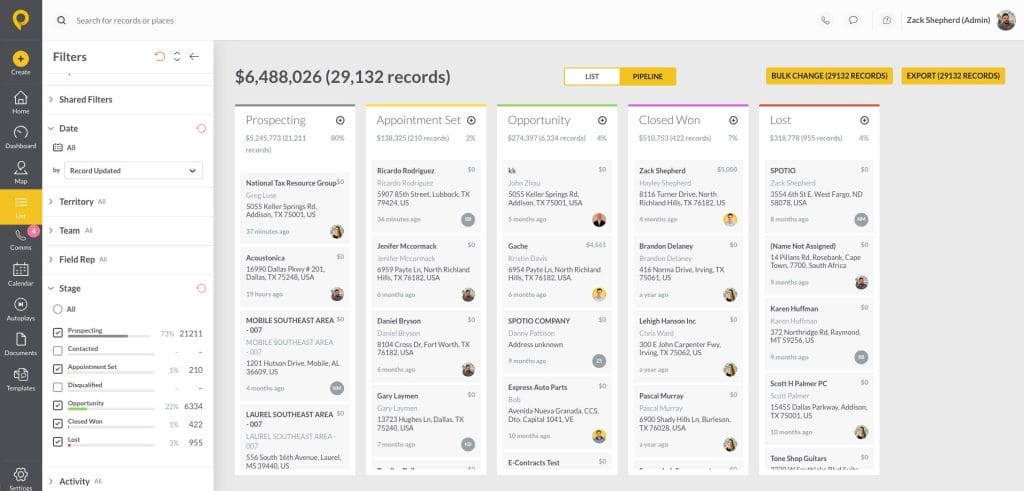
SPOTIO Pipeline Management on Web
2. Salesforce Sales Cloud (Agentforce Sales)
Best For: Large enterprises with complex sales processes, multiple product lines, and dedicated Salesforce admin resources
G2 Rating: 4.4/5 (25,400+ reviews)
Salesforce is the most powerful CRM ever built — and also the most complex. Now rebranded as Agentforce Sales, it has leaned fully into AI with Einstein-powered forecasting, deal scoring, and automated data enrichment. For field sales teams, Salesforce’s strength is its reporting depth and integration breadth; its weakness is that it’s fundamentally a desktop-first platform. Mobile exists but feels like an afterthought compared to purpose-built field tools.
Pricing: Starter Suite from $25/user/month; Enterprise from $165/user/month. Additional costs for Premier Support, AI add-ons, and implementation services.
Key Capabilities:
- Pipeline management — Fully customizable deal stages, weighted forecasting, and territory planning at enterprise scale
- Einstein AI — Predictive lead scoring, deal health alerts, and AI-drafted email suggestions
- AppExchange — 5,000+ integrations; can connect to virtually any tool in your stack
- Territory management — Advanced territory hierarchies and assignment rules available (Enterprise tier and above)
- Reporting — Deepest reporting and dashboarding in the category
✅ What we like: Unmatched depth and customization for enterprise organizations; Einstein AI is genuinely useful at scale; if you’re already on Salesforce, SPOTIO integrates natively
⚠️ Watch out for: Steep learning curve and typically requires a dedicated admin; mobile app is not built for field rep workflows; implementation costs can rival or exceed license costs; mandatory Premier Support fees at higher tiers
From a business perspective, the reporting and analytics are extremely powerful. Managers can track pipeline health, team performance, and customer engagement in real time, which improves decision-making and visibility across departments. Himanshu R., verified G2 Review.
3. HubSpot Sales Hub
Best For: Growing SMB and mid-market teams that want sales, marketing, and CRM in one platform — particularly inbound-led sales motions
G2 Rating: 4.4/5 (13,300+ reviews)
HubSpot Sales Hub is the most complete out-of-the-box CRM experience at the SMB level — clean interface, fast setup, and a genuinely useful free tier that supports core pipeline tracking. The trade-off is that full pipeline management features (custom reporting, sequences, deal scoring) require Professional plans at $100/seat/month or higher, and HubSpot’s pricing scales quickly as teams grow. For field sales teams, HubSpot works best as the CRM of record when paired with SPOTIO for field execution — not as a standalone field sales tool.
Pricing: Free tier available (2 users, limited features). Sales Hub Starter from $20/user/month; Professional from $100/user/month. Note: mandatory onboarding fees apply on Professional tier ($1,500+).
Key Capabilities:
- Visual pipeline — Drag-and-drop deal management with customizable stages and deal properties
- Email and calling — Built-in email tracking, templates, sequences, and a VoIP dialer
- AI features — AI email drafting, deal summaries, and predictive deal scoring on Professional+
- Reporting — Pre-built and custom dashboards; more robust on Professional tier
- SPOTIO integration — Connects via Zapier (sync frequency depends on Zapier plan)
✅ What we like: Best free entry point in the category; sales and marketing data in one place; fast onboarding for SMB teams new to CRM
⚠️ Watch out for: Pricing escalates significantly at Professional tier; onboarding fees are mandatory; mobile app is adequate but not designed for field rep workflows; full pipeline features are paywalled
HubSpot has everything I need, and the Sales Hub is truly stellar. The pipeline management saves me a ton of time and keeps me focused on the right priorities. The automation also works really well, letting me personalize outreach while still automating follow-ups with prospects. Anne G., verified G2 review
4. Pipedrive
Best For: Small to mid-sized inside sales teams that want a clean, visual pipeline without the complexity of Salesforce or HubSpot
G2 Rating: 4.3/5 (3,044 reviews)
Pipedrive built the category-defining visual pipeline interface — the drag-and-drop kanban board most CRMs have since copied. It remains the simplest, fastest-to-deploy pipeline-focused CRM for teams that want to track deals without fighting their software. The “deal rotting” feature (which flags deals that haven’t advanced stages within a set timeframe) is a genuinely useful aging signal. For field sales teams, Pipedrive’s mobile app is lightweight but lacks territory management; it’s best for field reps who need a clean deal tracker, not a full field execution platform.
Pricing: Essential from $14/user/month; Advanced from $34; Professional from $49; Power from $64; Ultimate from $79. All billed annually.
Key Capabilities:
- Visual pipeline — Intuitive drag-and-drop interface with customizable deal stages
- Deal rotting — Automatic flagging of deals that haven’t advanced past a configurable threshold
- Email integration — Two-way email sync, templates, and open/click tracking
- AI features — AI email writing assistant and deal summaries on higher tiers
- Reporting — Activity-based and revenue reports; custom dashboards on Advanced+
✅ What we like: Fastest onboarding of any CRM in this list; deal rotting feature is a practical aging signal; clean mobile app for reps who travel but aren’t doing D2D
⚠️ Watch out for: No native territory management; AI features are limited compared to Salesforce or Freshsales; advanced reporting requires higher-tier plans; marketing automation requires an expensive add-on
This tool offers a clear, visual pipeline that genuinely improves my deal management. I’ve also had an excellent experience with customer service. The workflow automation is helpful, and the data import process feels seamless. Bob M., verified G2 review
5. Zoho CRM
Best For: Budget-conscious teams that need a full-featured CRM with solid automation, AI capabilities, and a free entry tier
G2 Rating: 4.1/5 (2,920+ reviews)
Zoho CRM punches well above its price point. The platform includes lead management, workflow automation, a built-in AI assistant (Zia), territory management, and gamification features — all at pricing that starts at $14/user/month for the Standard tier. It’s not as polished as HubSpot or as powerful as Salesforce, but for teams that need enterprise-adjacent features without enterprise pricing, it’s a serious option. SPOTIO integrates with Zoho CRM for teams that want field execution layered on top.
Pricing: Free tier (up to 3 users). Standard from $14/user/month; Professional from $23; Enterprise from $40; Ultimate from $52. All billed annually.
Key Capabilities:
- Pipeline management — Multi-pipeline support, deal stage tracking, and forecasting modules
- Zia AI — Lead scoring, anomaly detection, and deal predictions powered by Zoho’s AI engine
- Territory management — Territory hierarchies and assignment rules (Enterprise tier)
- Automation — Workflow rules, macros, and process builders without coding
- Gamification — Sales contests and leaderboards to drive rep performance
✅ What we like: Best value-for-features ratio in the category; territory management available at Enterprise tier; strong automation capabilities at mid-tier pricing
⚠️ Watch out for: Interface feels less polished than HubSpot or Pipedrive; mobile app not built for field workflows; Zia AI can feel inconsistent; territory management only at Enterprise tier ($40/user/month+)
Zoho CRM is very flexible and customizable, which helps in managing leads, pipelines, and customer data in a structured way. I particularly like how everything is centralized—emails, calls, notes, and deals are all in one place. Abhijith P., verified G2 review
6. Freshsales
Best For: SMB and mid-market teams that want AI-powered pipeline intelligence with built-in calling and email — at a price below Salesforce and HubSpot
G2 Rating: 4.5/5 (1,230+ reviews)
Freshsales stands out in the mid-tier for one reason: Freddy AI is genuinely useful, not just a marketing badge. Lead scoring, deal health predictions, and next-step suggestions are built into the core product rather than bolted on as expensive add-ons. The built-in phone (no separate dialer required) and AI-powered email writing make it a strong option for teams doing heavy outbound. For field sales, Freshsales works well as a CRM of record when paired with a dedicated field execution layer; it doesn’t have territory mapping or location-verified activity natively.
Pricing: Free tier (up to 3 users). Growth from $9/user/month; Pro from $39; Enterprise from $59. All billed annually.
Key Capabilities:
- Freddy AI — Lead scoring, deal health signals, predictive forecasting, and AI-drafted emails and calls
- Built-in phone — VoIP dialer with call recording, transcription, and auto-logging — no third-party tool required
- Visual pipeline — Kanban and list views with drag-and-drop stage management
- Sequences — Multi-step outreach sequences combining calls, emails, and tasks
- Reports — Activity, revenue, and forecasting reports with customizable dashboards
✅ What we like: Best AI features under $60/user/month; built-in dialer eliminates a tool from your stack; fast setup with clean onboarding
⚠️ Watch out for: No territory management or field-specific features; mobile app is serviceable but not field-first; some advanced workflow features require higher-tier plans
Freshsales is easy to use and everything is in one place. I like the lead tracking and email follow-ups, it saves time and keeps things organized. The pipeline view also helps me clearly see deals and focus on the important ones. Himanshu L., verified G2 review
7. Close CRM
Best For: High-velocity inside sales teams making significant call volume daily — SDRs, outbound-heavy SMBs, and startups doing cold outreach
G2 Rating: 4.7/5 (2,040+ reviews)
Close was built by and for salespeople who live on the phone. The built-in power dialer, predictive dialer, and SMS capabilities mean reps can run an entire outreach workflow without leaving the platform. Its pipeline view is clean and fast; the search and filter capabilities are among the best in the category. For field sales teams, Close is a poor fit — there’s no territory management, no mobile-first design, and no location-verified activity. For inside sales teams making 50+ calls a day, Close is in a category of its own. For field sales managers, it’s not the right fit — but the distinction is worth knowing.
Pricing: Startup from $49/month (1 user); Professional from $99/user/month; Enterprise from $139/user/month.
Key Capabilities:
- Built-in dialer — Power, predictive, and preview dialers without a separate subscription
- SMS and email — Two-way SMS, email sequences, and full communication history in one thread
- Pipeline view — Clean, fast deal tracking with drag-and-drop stage management
- Call recording and transcription — Automatic call transcription and AI-powered call summaries
- Reporting — Activity, pipeline, and revenue reporting with custom leaderboards
✅ What we like: Best calling experience in the category by a significant margin; clean interface that inside sales reps actually adopt; fast search across all activity history
⚠️ Watch out for: Not designed for field sales — no territory management, no mobile-first design, no GPS/location features; pricing is per-seat and escalates; not the right fit if your team is outside more than inside
Close is how simple and intuitive it is to use. Everything I need…..calls, emails, follow-ups, and pipeline tracking is in one place, which makes it easy to stay organized and move quickly. Oge E., verified G2 review
8. Copper CRM
Best For: Google Workspace-native sales teams that want a CRM that lives inside Gmail — no separate login, no context switching
G2 Rating: 4.5/5 (1,150+ reviews)
Copper’s entire value proposition is Google Workspace integration. Contacts, emails, deals, and tasks all live in your Gmail sidebar — the CRM updates as you send and receive emails, without manual data entry. For teams that run their entire sales process through Gmail and Google Calendar, it eliminates the friction of “now go update the CRM.” For field sales teams working outside, it’s a poor fit: Copper has no territory management, no mobile field logging, and is optimized for email-based relationships rather than geographic selling.
Pricing: Starter from $9/user/month; Basic from $23; Professional from $59; Business from $99. All billed annually.
Key Capabilities:
- Gmail-native interface — CRM sidebar lives directly in Gmail; contacts and deals update from email activity
- Automatic data capture — Emails, meetings, and contacts sync automatically from Google Workspace
- Pipeline management — Visual pipeline with customizable stages and deal tracking
- Google integrations — Deep sync with Google Calendar, Google Drive, and Google Meet
- Reporting — Pipeline and activity reports with Google Data Studio integration
✅ What we like: Genuinely eliminates CRM friction for Gmail-native teams; automatic data capture means reps don’t have to log emails manually; fast setup for Google Workspace shops
⚠️ Watch out for: Only makes sense if your team lives in Gmail — without Google Workspace, there’s little reason to choose Copper over Pipedrive or Zoho; no territory management; no field sales features; limited mobile functionality
We use Copper as our main CRM to manage full lead pipelines and maintain long-term client relationships across our marketing agency. It perfectly unifies prospect nurturing, daily client management and cross-team workflow coordination. Its greatest strength is the flawless native integration with Google Workspace, especially built-in Gmail functionality. Thomas T., verified G2 review
9. Monday Sales CRM
Best For: Cross-functional teams that want CRM and project management in one platform — particularly ops-driven organizations where visibility across departments matters
G2 Rating: 4.6/5 (1,130+ reviews)
Monday Sales CRM sits on top of the Monday Work OS foundation, which means it’s highly customizable and connects sales data to the broader organizational workflows teams already use. The interface is visually clean and non-technical users adopt it quickly. For standard pipeline management — tracking deals, managing contacts, automating follow-up reminders — it works well. For field sales teams specifically, Monday lacks territory management, location-verified activity, and any mobile-first field execution capability. It’s a strong general-purpose CRM; it’s not a field sales tool.
Pricing: Basic from $12/seat/month; Standard from $17; Pro from $28; Enterprise (contact for pricing). Free trial available.
Key Capabilities:
- Customizable pipelines — No-code board customization; adapt pipeline stages and deal properties without technical resources
- Automations — Rule-based automations that trigger actions across deals, tasks, and notifications
- Dashboards — Visual dashboards that combine CRM data with project and operational data
- Integrations — Connects to 200+ tools including Salesforce, HubSpot, Slack, and Zoom
- AI features — AI-powered deal summaries and workflow suggestions on higher tiers
✅ What we like: Easiest interface to adopt in the category; works well for teams that need CRM visibility alongside project data; customization is genuinely no-code
⚠️ Watch out for: Not built for field sales — no territory management, no GPS, no mobile field logging; sales-specific features are less deep than purpose-built CRMs; pricing is per seat and can add up for larger teams
10. Zendesk Sell
Best For: Teams already using Zendesk for customer support who want sales pipeline visibility in the same platform — unified customer record across support and sales
G2 Rating: 4.2/5 (338 reviews)
Zendesk Sell’s biggest differentiator is also its biggest limitation: it makes the most sense if you’re already a Zendesk customer. The shared customer view between support tickets and sales deals is genuinely valuable for teams where support and sales interact with the same customers regularly. Outside of that use case, Zendesk Sell offers solid but unremarkable pipeline management — visual stages, basic forecasting, email integration — at pricing that’s higher than Zoho or Freshsales for comparable features.
Pricing: Team from $19/agent/month; Growth from $55; Professional from $115; Enterprise from $169+. All billed annually.
Key Capabilities:
- Unified customer view — Sales deals and Zendesk support tickets share the same contact record
- Pipeline management — Standard visual pipeline with deal stage tracking and forecasting
- Email integration — Two-way email sync with tracking and templates
- Built-in dialer — Click-to-call with call recording and logging
- Reporting — Pipeline, activity, and goal-tracking reports
✅ What we like: If you use Zendesk Support, the shared customer record is a genuine competitive advantage; solid out-of-the-box pipeline tracking; reasonable entry pricing at Team tier
⚠️ Watch out for: Zendesk Sell will be retired on August 31, 2027. Zendesk has named Pipedrive as its official migration partner — see entry #4 above. If you’re currently on Zendesk Sell, start your migration planning now; data will be permanently deleted at retirement.
How to Choose the Right Pipeline Tool for Your Team
After reviewing 10 options, the choice usually comes down to your sales motion and your team’s daily workflow:
If your reps are in the field — territories, D2D, outside sales: SPOTIO is the only purpose-built option on this list. The others can manage a pipeline, but none handle territory assignment, location-verified activity, and mobile-first logging in a single platform.
If you’re a Gmail-native team under 20 people: Copper or HubSpot’s free tier get you started without friction. Copper if your entire workflow lives in Gmail; HubSpot if you want more pipeline structure.
If you’re an enterprise or mid-market team on Salesforce: Keep Salesforce as your system of record and add SPOTIO for field execution. The native integration means field activity data flows into your existing pipeline without manual reconciliation.
If you want the best calling features: Close is purpose-built for high-volume inside sales. No field capabilities, but the best dialer experience in the category.
If budget is the primary constraint: Freshsales Growth ($9/user/month) or Zoho Standard ($14/user/month) give you full pipeline management with AI features at entry-level pricing.
Whichever tool you choose, the real test is whether it gives you pipeline reports you can act on — coverage ratios, stage velocity, and rep-level deal aging. Our sales pipeline reporting guide covers what to include, how to structure your weekly review, and the benchmarks that separate healthy pipelines from stalled ones.
If you’re even earlier in the process — weighing whether to buy a purpose-built platform or build something custom — the calculus is worth working through before you start demos. The real costs of building field sales software tend to run much deeper than developer salaries, and the timeline surprises most teams.
Frequently Asked Questions
Sales pipeline management software is a tool that tracks deals through defined stages from first contact to close, giving managers visibility into deal health, rep performance, and forecast accuracy. Most CRMs include pipeline management as a core feature. Field sales teams specifically need tools that add territory management, mobile-first logging, and location-verified activity to standard pipeline functionality.
A regular CRM assumes reps are at desks updating records between calls. Field sales pipeline software is built for reps who are moving between accounts in the field — it needs to work on mobile, capture activity with minimal friction (one tap, not five screens), handle offline use, and connect deal data to geographic territory coverage. SPOTIO is the category leader for this use case; most general CRMs require significant workarounds to support field workflows.
For field sales teams: territory management, mobile-first design, offline capability, location-verified activity logging, and CRM integration. For inside sales teams: visual pipeline stages, built-in calling or email sequencing, deal scoring, and forecasting. For both: G2 rating above 4.0, pricing transparency, and a free trial to test rep adoption before committing.
Entry-level plans range from free (HubSpot, Zoho, Freshsales for up to 3 users) to $9–$25/user/month for core pipeline features. Mid-tier plans with AI, advanced automation, and reporting run $40–$65/user/month. Enterprise plans (Salesforce, Zendesk) start at $115–$165/user/month and can exceed $500/user/month with add-ons. SPOTIO starts at ~$25/user/month with a 5-user minimum.
SPOTIO is purpose-built for field sales and the only tool on this list with native territory management, location-verified activity logging, one-tap mobile logging, and offline support in a single platform. For teams already on Salesforce or HubSpot, SPOTIO integrates natively to add field execution capability without replacing your existing CRM.
Yes — most tools on this list integrate with Salesforce, HubSpot and other leading CRMs, including SPOTIO. Pipedrive, Zoho, Freshsales, and Close connect via API or Zapier. Copper integrates natively with Google Workspace but uses Zapier for Salesforce/HubSpot. Monday Sales CRM connects to both via native integration. If Salesforce is your system of record, SPOTIO’s native integration is the strongest field-execution add-on available.
See SPOTIO in Action
The right pipeline tool gives your field sales team visibility, accountability, and a system that actually works on the road. SPOTIO was built specifically for managers whose reps work territories in the field — not as a CRM retrofit.
Request a demo to see territory management, pipeline reporting, and DASH AI in action →

Krystal brings a rare combination of direct sales, TV/media, and B2B SaaS marketing expertise to her writing. With 10+ years leading integrated marketing campaigns for global organizations, she knows how to build scalable marketing engines that drive real revenue — not just impressions. Her background in direct sales gives her a grounded, practical perspective on what it actually takes to close deals and connect with customers.