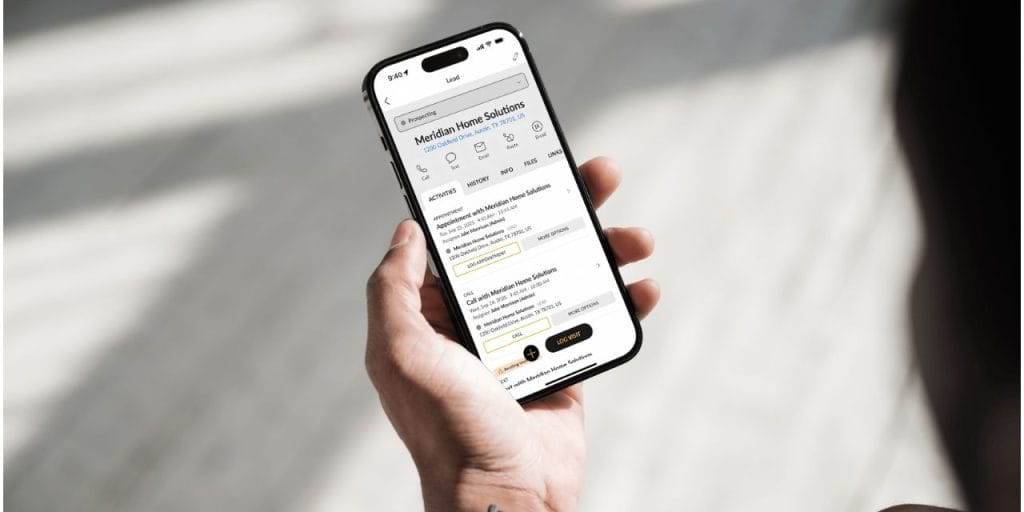

Your CRM has a mobile app. So does every other enterprise CRM on the market. That’s not the same thing as a mobile CRM — and the difference shows up every day in your pipeline data.
Here’s what it looks like in practice: a rep finishes a promising visit at 2pm. They’re back in their truck, next appointment in 12 minutes, territory to cover. Updating Salesforce on a phone means navigating four screens, re-entering context they already gave verbally, and typing notes while trying to remember which prospect said what. Most reps don’t do it. They tell themselves they’ll catch up tonight. They won’t — or they will, and the data will be wrong.
According to SPOTIO’s State of Field Sales research, the average field rep spends 21% of their work week on administrative tasks and data entry — roughly 8 hours per rep, per week. On a 10-person team, that’s more than 4,400 hours of selling capacity lost every year to a tool that wasn’t built for how field sales actually works. This guide breaks down what separates a genuine mobile CRM from a desktop CRM with a mobile app, what field teams actually need, and how to evaluate platforms before you buy.
What Is a Mobile CRM?
A mobile CRM is a customer relationship management platform designed from the ground up to be used in the field — on a phone, between stops, without a desk, often without reliable connectivity. It’s not a stripped-down version of an enterprise CRM. It’s a different architecture built around a different workflow.
The distinction matters because the way field reps work is fundamentally different from inside sales. Inside reps sit at computers, log calls after they hang up, and update records in a steady environment. Field reps move constantly — parking lots, front doors, trucks, construction sites. Data has to be captured at the moment it happens or it degrades fast.
Mobile CRM vs. Desktop CRM
The practical difference comes down to friction. A desktop-first CRM adapted for mobile still carries the weight of its original architecture — deep menus, multi-field forms, slow load times on a cell connection. A rep doing 15 stops a day can’t afford that overhead at every stop.
| Desktop CRM (Mobile App) | Mobile-First CRM | |
|---|---|---|
| Designed for | Desk-based inside sales | Field reps between stops |
| Data entry | Multi-screen forms | One-tap or voice |
| Connectivity | Requires stable connection | Offline-capable |
| Territory view | List or table | Live map |
| Adoption in the field | Low — too much friction | High — built for the workflow |
Asking a field rep to use Salesforce on a 6-inch screen isn’t a technology problem — it’s a square peg, round hole problem. The tool was never designed for how that rep spends their day.
Why CRM Adoption Fails in the Field
Low adoption isn’t a training problem. It’s not a motivation problem. It’s a design problem. Reps don’t update CRMs because the tools make updating harder than not updating.
SPOTIO’s State of Field Sales research found that the average field rep spends nearly 5 hours per week on CRM data entry alone — before you count territory planning, route guessing, and end-of-day catch-up admin. The combined admin tax across administrative tasks and data entry is 21% of the average field rep’s work week.
See how field teams cut the admin tax. Request a SPOTIO demo →
The Cost of Delayed Data Entry
When a rep logs a visit six hours after it happened, the data quality is already degraded. According to HubSpot, 22.5% of B2B data goes bad each year — and that’s under normal conditions. For a field rep reconstructing six visits from memory at 8pm, the decay is faster. Budget conversations go fuzzy. Decision timelines get dropped. The objection that came up at the door doesn’t make it into the notes.
What the manager sees in the pipeline isn’t what’s actually happening in the field. The CRM becomes a reporting tool instead of a management tool — and even as a reporting tool, it’s unreliable.
Why Inside Sales Tech Doesn’t Translate
Salesforce, HubSpot, and similar platforms are genuinely excellent for the workflows they were built for. But those workflows assume a rep who is stationary, connected, and has time to navigate a full CRM interface between calls. Field sales breaks every one of those assumptions.
The result is a pattern that plays out on teams everywhere: the company buys a CRM, spends months customizing it, rolls it out to the field team, and watches adoption stall at 50% within three months. The CRM isn’t bad. It’s wrong for the job. SPOTIO’s research found that 78% of low-turnover field sales teams use a CRM or platform — versus just 54% of high-turnover teams. The gap isn’t access. It’s fit.
What a Mobile CRM Should Deliver
The value splits clearly between what helps a rep sell more and what gives leadership a team they can actually manage. A genuine mobile CRM has to do both — because if reps don’t use it, leaders don’t get the data, and the whole system fails.
For Reps: Remove Every Barrier Between the Visit and the Record
Frictionless activity capture. Every extra step between finishing a visit and logging it is a data point at risk of disappearing. The best mobile CRMs capture visit outcomes in a single tap — outcome, GPS coordinates, timestamp, done. AI-assisted tools go further: reps can log notes, draft follow-ups, and update records by voice between stops, with a confirmation tap before anything is written. When logging takes three seconds, reps do it every time. Our AI sales automation guide breaks down the full range of tasks AI can handle for field reps — and the moments that must stay human.
A live map that tells them what to do next. Field reps manage a geography, not a contact list. A genuine mobile CRM shows their assigned territory on a live map, with prospects color-coded by status and coverage gaps visible at a glance. The best platforms surface nearby prospects within the territory too — so a cancelled appointment becomes a productive stop instead of dead time. The map is the job.
Offline access. Basements, rural routes, new construction sites, apartment buildings with no signal — field reps work everywhere. A CRM that requires connectivity to log an activity will always have gaps in the data, and those gaps will always be in the hardest-to-reach accounts. The right mobile CRM lets reps pre-download their territory and work through dead zones without losing a thing.
Built-in guidance that gets new reps productive fast. A new rep’s first 30 days determine whether they stay or leave. A mobile CRM with in-app AI guidance — answering product questions, walking through workflows, briefing reps on accounts before they knock — compresses that ramp dramatically. The platform becomes the coach when the manager can’t be there.
For Leadership: Make the Invisible Visible
Location-verified activity data. There’s a meaningful difference between a rep saying they worked a territory and a record showing visits logged at specific GPS coordinates at specific times. Location-verified check-ins aren’t surveillance — they’re the foundation of a pipeline you can trust. Managers can see exactly what’s happening across their team at any point during the day, without end-of-day reports or check-in calls.
Real-time territory coverage visibility. Without it, managers are coaching on gut feel and end-of-week summaries. With it, they can see which territories are going cold, which reps need a ride-along, and where coverage is falling short — early enough to actually do something about it. That’s the difference between reactive management and coaching that compounds. Pipeline reporting is the other half of that visibility equation. For a side-by-side look at which tools handle stage tracking, deal aging, and field-specific pipeline management, see our pipeline management tools guide.
CRM sync that flows without rep involvement. Field activity data needs to reach your system of record automatically. SPOTIO offers two-way sync with leading CRMs like Salesforce, HubSpot, and Pipedrive — so the pipeline reflects what’s actually happening in the field without anyone having to manually reconcile two systems.
How Field Reps Use SPOTIO Between Stops
This is what the workflow actually looks like on the ground — not a feature list, but the sequence a rep moves through during a typical day.
Before the first door: The rep opens SPOTIO and sees their territory on a map. Leads are color-coded by status — new prospects, recent contacts, open follow-ups. DASH pulls up a quick account brief for the first stop — last visit date, what was discussed, any open tasks. The rep walks to the door knowing the context without having to dig through notes.
At the door: The visit happens. Whatever the outcome — interested, not home, callback requested — the rep logs it with a single tap before they’re back at the truck. GPS coordinates attach to the logged visit. If there’s a follow-up to schedule, they enroll the prospect in an AutoPlay — a multi-step sequence that queues the next call, text, or visit — right from the same screen.
Between stops: DASH lets the rep interact with SPOTIO by voice between stops — asking for a quick brief on the next account, confirming a follow-up action with a tap, or reviewing a drafted follow-up text for a prospect they just visited — all without pulling over to type. Every action shows a confirmation preview before anything is written to SPOTIO. The rep approves it, and the update is made — co-pilot, not autopilot.
Any time of day: The manager opens the pipeline view and sees exactly what’s happened — which accounts were visited, which territories are being covered, which reps are running behind on follow-ups. No end-of-day reports. No phone calls asking for updates. The data is already there.
Wire 3 results: A Central Florida fiber-to-home provider implemented SPOTIO across their D2D field team and saw a 309% increase in territory visits, a 21% lift in calls, and a 7% improvement in appointment-setting rates — without adding headcount. As SVP of Sales and Marketing Ryan Dendievel put it: “Reps need to understand that using a platform like SPOTIO isn’t about ‘big brother’ monitoring — it’s about helping them close more deals and make more money.”
What Changes When the Tool Fits
The admin time math is blunt. At 8 hours per rep per week in admin, a 10-person field team is losing 4,400+ hours of potential selling time every year. Shift even half of that back to selling and you’ve added the equivalent of a full-time rep’s productive output without a hire.
But the bigger gain is data quality. When reps log activity in real time, managers can actually trust what the pipeline shows. That means better coaching — because you can see which reps are struggling with specific account types, not just which ones are behind on quota. Better forecasting — because the stage data reflects real conversations, not reconstructed memory. And better territory decisions — because you can see where coverage is thin before it shows up in missed targets.
Lobel Financial results: A consumer finance company managing 50+ field reps across dealer territories had no way to verify visits or manage territory coverage. Within eight months of implementing SPOTIO, they achieved a 4x increase in loan application volume — driven by location-verified visit accountability and territory-based performance coaching.
Low-turnover field sales teams are 2.4 times more likely to run 1–2 core systems rather than 5 or more disconnected tools. The consolidation isn’t about saving money on software. It’s about giving reps a single tool they’ll actually use every day, and giving managers a single source of truth they can actually act on.
How to Choose a Mobile CRM for Your Organization
Before you book demos, get clear on four questions:
1. Is it mobile-first or mobile-adapted? Ask the vendor to show you how a rep logs a visit. If it takes more than two taps, it’s adapted, not built. Adoption will suffer.
2. Does it handle territory management, or just contacts? A contact list on a map is not territory management. Look for the ability to assign boundaries, track coverage density, and visualize gaps — not just pin locations.
3. Does it work offline? Test this during the demo. Take the app into airplane mode and try to log an activity. If it fails, your reps in rural areas or building interiors will have constant data gaps.
4. Does it connect to your existing CRM, if you have one? The field execution layer and the system of record need to talk to each other. Confirm whether the integration is native or Zapier-based, and what that means for sync frequency and data completeness. If you don’t yet have a CRM, look for a platform that handles pipeline management and reporting natively, so you’re not adding a second tool on day one.
Still weighing whether to buy a purpose-built platform or build something custom? See the real cost breakdown before you start demos. For a full side-by-side comparison of the leading mobile CRM platforms for field teams, see our mobile CRM tools guide.
Frequently Asked Questions
A mobile CRM is a customer relationship management platform designed for use in the field — on a phone, between stops, with or without connectivity. Unlike a desktop CRM with a mobile app, a mobile-first CRM is built around the workflow of reps who are moving constantly: one-tap logging, offline access, territory visualization, and location-verified activity capture. The goal is data that gets captured when it happens, not reconstructed at the end of the day.
A regular CRM assumes reps are at desks between calls. A mobile CRM assumes reps are in parking lots between appointments. The practical difference is friction: desktop-first CRMs require multi-screen forms and stable connectivity. Field-native CRMs capture activity in one tap, provide offline access to CRM data, and display territory data on a live map. For reps doing 10–20 stops a day, that friction difference determines whether data gets logged or doesn’t.
What matters most to a rep in the field: fast activity capture with AI assistance, a live map that shows their territory and who to hit next, offline access when the signal drops, and prospect discovery within their assigned area. What matters most to sales leadership: location-verified check-ins that make pipeline data trustworthy, real-time visibility into territory coverage and rep activity, and two-way CRM sync so field data flows into the system of record without manual effort. The best mobile CRM platforms deliver all of it. For a full platform-by-platform comparison, see our mobile CRM tools guide.
The best ones do. SPOTIO’s Download My Day feature lets reps pre-download their territory and work for up to 24 hours without connectivity — logging visits, accessing prospect data, and updating records. Everything syncs when connectivity returns. If a platform can’t demonstrate offline functionality during a demo, it will have data gaps anywhere cell coverage is inconsistent.
SPOTIO is a field sales execution platform with mobile CRM at its core. Reps log activity with one tap, GPS coordinates attach to the logged visit, and data syncs to your preferred CRM, or you can use SPOTIO as your CRM. DASH, SPOTIO’s AI co-pilot, lets reps use voice input to get account briefs, update records, and draft outreach — with a confirmation preview before anything is written to SPOTIO. Territory management, prospect discovery, and pipeline reporting are all built into the same mobile-first interface.
Because most CRMs weren’t built for field workflows. The friction of logging a visit on a desktop-first mobile app — multiple screens, required fields, connectivity dependency — means reps defer updates until the end of the day, when memory has already degraded. SPOTIO’s State of Field Sales research found that the average field rep spends nearly 5 hours per week on CRM data entry alone. The fix isn’t training. It’s a tool that captures data as a byproduct of the work, not as a separate task after it.
They overlap significantly but aren’t identical. A mobile CRM focuses on managing customer relationships — logging activity, tracking pipeline, and syncing data. Field sales software typically adds execution layers on top: territory management, route planning, canvassing tools, and AI-assisted workflows. SPOTIO combines both — it functions as the mobile CRM of record for field teams while adding the territory, routing, and AI capabilities that generic CRMs don’t provide.
The Bottom Line
The right mobile CRM doesn’t just give your reps a tool they’ll actually use — it gives you data you can actually manage from. Wire 3 added 309% more territory visits without adding headcount. Lobel Financial quadrupled loan application volume in eight months. Neither result came from working harder. Both came from having a system built for how field sales actually works.
See how SPOTIO works for field teams like yours →

Trey Gibson is the founder and CEO of SPOTIO, where he helps sales leaders build more efficient, high-performing field sales teams. With a background in entrepreneurship and as the founder of a roofing company, Trey brings hands-on experience leading door-to-door and B2B sales organizations. He combines real-world sales leadership with a passion for technology and operational efficiency to help teams scale, perform, and win more deals.
Research and drafting assisted by AI tools; all content is reviewed, fact-checked, and approved by Trey and the SPOTIO editorial team.