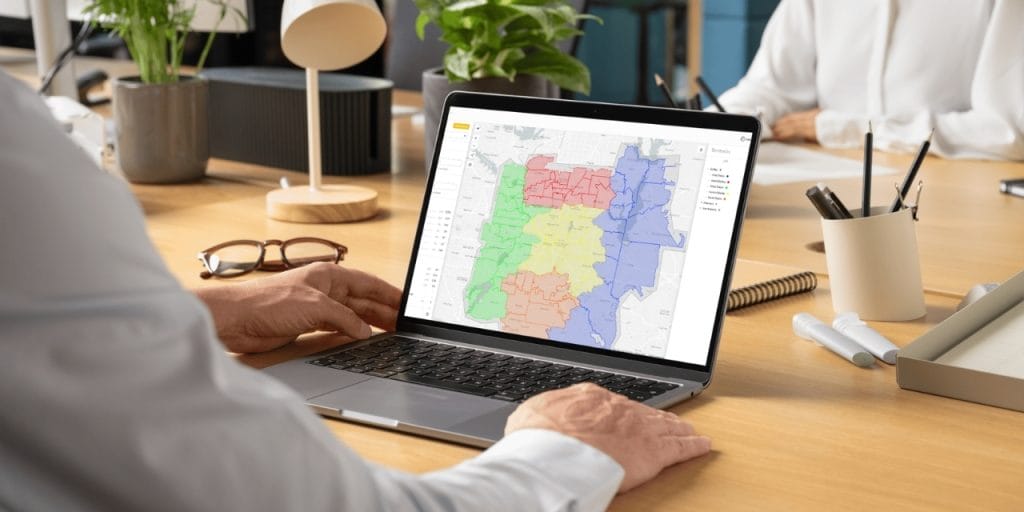

Two reps from the same company knock the same door on the same street, two days apart. Neither knew the other had already been there. No one had set clear territory boundaries, so both reps assumed the area was theirs. The homeowner — already annoyed — told the second rep to take them off the list.
That’s not a rep problem. That’s a territory design problem.
According to Sales Management Association research, only 36% of companies rate their own territory design as effective. The same research found that companies with effective territory design achieve 14% higher sales objective attainment than average — while those with poor design land 15% below. The gap isn’t headcount or product. It’s how territories are built.
Most field sales territory mapping problems come down to teams working from spreadsheets, rough geography, and gut feel. Zip code-based territories fix this — but only if you build them right. This guide walks through when zip code territories work, how to design them well, and how to build them in SPOTIO so your team hits the field with clear boundaries, zero overlap, and every area covered.
Why Zip Codes Work for Field Teams
Not every territory model works for every team. Zip codes have become the default for field sales — and for good reason.
Zip codes vs. other boundary types
State or regional boundaries are too broad for most field teams. Assigning a rep to “the Southeast” or “Northern California” creates massive territories that are impossible to work systematically, and impossible to report on with any precision. County or city boundaries are better — but they don’t align with how prospect data is organized, and they’re awkward to import or manage in most CRM and mapping tools.
Zip codes hit the sweet spot. They’re granular enough to give reps clear, workable areas. They’re universally recognized in CRM systems, lead lists, and mapping software. And they map directly to how most B2C and local B2B prospect data is structured — which makes importing, assigning, and tracking coverage straightforward.
For field teams running door-to-door or local territory-based selling, zip codes also align naturally with how reps think about their day. “I’m working the 75201 and 75202 zip codes this week” is a clear, actionable assignment. “You’ve got the north side of the metro” is not.
Which teams benefit most
Zip code territory mapping is especially well-suited for:
- D2D and residential teams — roofing, solar, home services, telecom/fiber, alarm and security. Precise boundaries prevent overlap and make coverage tracking possible.
- Local B2B field teams — medical device, distribution, commercial services. Zip codes align with account address data and make it easy to cluster accounts geographically for efficient routing.
- Multi-rep orgs with 5+ reps — below that threshold, named accounts or simple city assignments often suffice. Once you have overlapping geographic coverage, structured boundaries matter.
- Fiber-to-home and telecom operators — teams running line passings coverage use zip codes (or KML/KMZ boundary files for fiber passings) to track penetration rate by service area.
When zip codes aren’t the right fit
Zip codes work best when your prospects are distributed across a physical geography. If your sales motion is fully remote, account-based (national accounts assigned by relationship rather than location), or segmented by industry vertical rather than location, geographic territories add overhead without value. For those motions, named account assignments or vertical-based territories make more sense.
What Makes a Zip Code Territory Actually Work
Drawing the boundaries is the easy part. What separates a territory design that holds up over time from one that falls apart in the first quarter is the judgment behind the lines.
Balance by potential, not by area
The most common mistake in territory design is treating zip codes as equal units. They’re not. A zip code covering a dense urban neighborhood might have 8,000 households. A zip code covering a rural county might have 800 — spread across 200 square miles.
Balance your territories by prospect count or revenue potential, not by the number of zip codes assigned. A rep with 12 rural zip codes and a rep with 3 urban zip codes might be looking at completely different workloads. Pull your account or lead data first, score each zip code by density and potential, then group zip codes into territories that give each rep a realistic and comparable opportunity.
One distribution company that onboarded with SPOTIO imported their account data and quickly discovered that 60–80% of their West Coast territory was uninhabited land — mountains, farmland, and nature preserves. They’d been assigning massive territories to reps who could realistically only work a small corner of them. Once the data was on a map, the problem was obvious. Before that, it was invisible.
Watch for phantom territory problems
Related to the above: not all zip codes on your list are workable. Common phantom territory problems include:
- Gated or restricted access areas — apartment complexes with locked entries, military bases, gated communities. These may appear on your map but produce zero activity.
- Commercial-only zip codes — if you’re running a residential motion, zip codes dominated by industrial parks or commercial zones will drain rep time for no return.
- Uninhabited or low-density rural zip codes — particularly common in Western states and distribution territories.
Before activating any territory design, run a quick sanity check: how many actual workable prospects exist inside each zip code? A territory with 20 zip codes that only contains 300 workable accounts isn’t better than one with 8 zip codes and 600.
Naming conventions that matter in the field
This one gets overlooked almost every time — and it causes real operational pain once your team is in the field.
On the SPOTIO mobile app, reps navigate territories by name, not by visual map hierarchy. The map view with color-coded territory layers is a web feature. On mobile — where your reps spend their day — territories appear as a list. If your territories are named “Territory 1,” “Territory 2,” and “Territory 3,” your reps are guessing which one is theirs. If they’re named “Dallas NE – 75080-75082,” the assignment is self-explanatory.
Build your naming convention before you start creating territories. A reliable format:
[City/Region] [Direction] - [Zip Codes]— e.g., “Austin South – 78741-78748”[Rep Last Name] - [City/Region]— e.g., “Hernandez – Fort Worth North”[Team] - [Area]— e.g., “Team A – Phoenix West”
One national telecom company came to SPOTIO without any naming conventions and no territory hierarchy. Their managers couldn’t pull territory-level reports, reps didn’t know which leads were theirs, and new hires had no frame of reference for where to start. Getting the naming convention right before building territories saves significant rework down the line.
Want to see how SPOTIO handles zip code assignment, coverage tracking, and rep reporting in one place? See territory management in SPOTIO →
How to Build Zip Code Territories in SPOTIO
Here’s the step-by-step workflow for creating territories by zip code in SPOTIO. Most managers get their first territory built in minutes once the underlying zip code list is ready.
Step 1 — Open the map and add a new territory
From the SPOTIO web app, navigate to the map view. Enable the Territories layer on the map to display your existing territory boundaries. Click Add Territory to open the territory creation workflow.
Choose a color for the new territory before you name it — this is how territories will be distinguished visually on the map. For a team of 8 or more reps, color coding is the fastest way to orient new hires on who owns what without opening the full territory list. SPOTIO provides a set of predetermined colors or lets you customize with the color picker.
Step 2 — Add zip codes using the copy-paste tool
This is the fastest way to build a territory from scratch. In the zip code entry field, paste a list of zip codes directly from a spreadsheet, email, or document — one per line or comma-separated. SPOTIO renders the corresponding boundaries on the map as you add them.
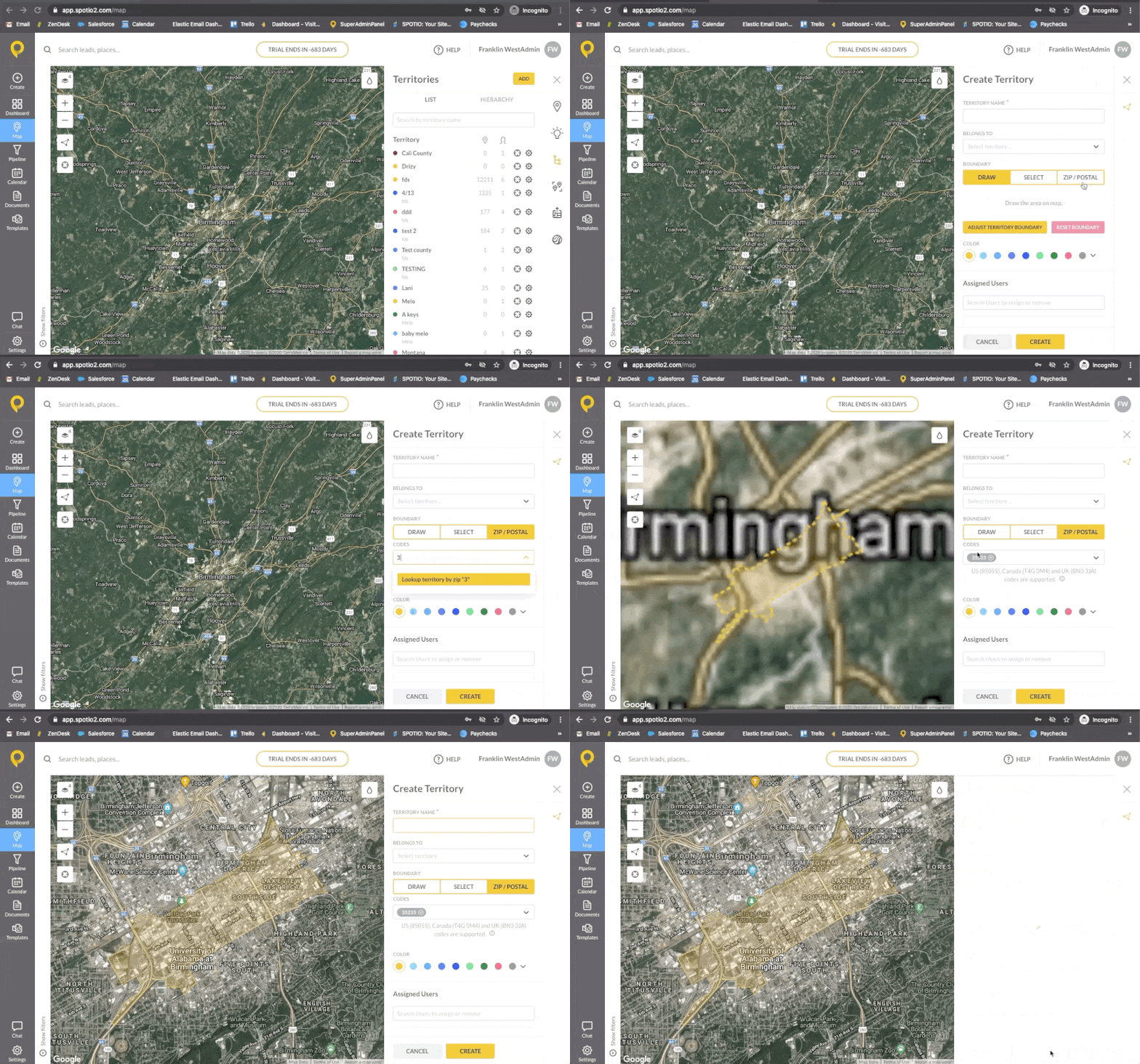
Paste a list of zip codes and SPOTIO draws the territory boundaries on the map — then name, color-code, and assign to your rep.
You can also select zip codes manually by clicking on the map, or use existing leads to define the territory boundary. For teams with a defined prospect list, the copy-paste method is almost always faster.
Once boundaries are drawn, visually verify the territory on the map. Check for any obvious geographic oddities — zip codes that jump across a highway, disconnected areas, or boundaries that extend into zones you didn’t intend to include.
Step 3 — Name, assign hierarchy, and assign reps
Name the territory following the naming convention you’ve established. Make it specific enough that any rep or manager on the team can understand what area it covers without opening the map.
Set the “Belongs To” hierarchy if you’re running a multi-level team structure. This field assigns the new territory as a sub-territory under a manager’s broader territory — useful for organizations where field managers oversee a region that contains individual rep territories. Note that the full territory hierarchy is visible in the web app; on mobile, reps see a list view.
Assign reps using the dropdown. You can assign multiple reps to a single territory if needed — for example, during overlap periods when a new rep is shadowing before taking full ownership.
Once saved, the territory appears on the map in your chosen color and is immediately visible to assigned reps in their mobile app.
Common Zip Code Territory Mistakes
Even with good data and a solid process, these are the territory design mistakes that show up most often — and cost the most to fix after the fact.
Reps working the same areas
Without explicit zip code boundaries, overlap is inevitable. Two reps cover what they think is their area, and no one has defined where one territory ends and the other begins. The result: duplicated effort, confused prospects, and rep conflicts that managers have to mediate.
A roofing team that onboarded with SPOTIO was experiencing exactly this — reps showing up at the same properties within days of each other, especially following storm events when everyone was working fast. Once territory boundaries were drawn by zip code and tied to the HailTrace storm data they were already using, the overlap disappeared. Reps knew exactly which doors were theirs.
Territories that can’t be worked
Assigning large territories based on zip code count rather than account density sets reps up to fail. A rep with 15 rural zip codes covering 800 square miles will spend most of their day driving, not selling. Saturating a rep with low-density territory doesn’t build pipeline — it burns time.
Build territories around realistic daily capacity. A rep targeting 15–20 field stops per day needs a territory where those stops are clustered close enough to route efficiently. If the geography doesn’t support that, break the territory into smaller zones worked on a rotating weekly basis rather than daily.
Not revisiting territories after market changes
Territory design isn’t a one-time event. The assignments that made sense when you launched may not make sense after:
- A rep leaves and their territory gets redistributed
- A new service area opens up and needs coverage
- A high-density zip code gets saturated after 6 months of consistent knocking
- A new build (subdivision, fiber expansion area) creates a pocket of new prospects
One field sales org that runs regular sales territory alignment reviews found that an entire zip code cluster had been effectively exhausted — reps had knocked nearly every door. Rather than continuing to work a cold territory, they reallocated reps to adjacent zip codes with fresh prospect density. The data made the case; without territory-level activity tracking, they’d have kept sending reps into a played-out area.
Measuring Coverage After You Build
Creating territories is step one. Knowing whether they’re actually being worked is step two. According to SPOTIO’s State of Field Sales report, field reps spend only 43% of their time actually selling. Every rep working the wrong territory — or a territory with phantom zip codes — compounds that problem directly.
Track coverage rate by zip code
In SPOTIO, managers can view activity by territory — visits logged, calls made, outcomes recorded — filtered by any time period using performance analytics. This tells you not just how much activity is happening, but where it’s happening and where it isn’t.
Pull a territory activity report after the first two weeks of a new territory design. You’ll quickly see which territories have no activity logged and which are getting consistent coverage. A practical rule: if a territory shows fewer than 3 logged activities per zip code over 30 days, that’s a coaching conversation. If it’s been 60 days and entire zip codes still show zero activity, that’s a territory assignment problem — not a rep problem.
Use activity data to adjust assignments
SPOTIO’s territory data is the feedback loop for your territory design. If one rep consistently over-performs their territory and another is barely scratching the surface of theirs, that’s a signal — either the territory sizes are imbalanced, or the rep assignments don’t match rep capability.
The goal isn’t perfect symmetry on day one. It’s building a territory structure with enough visibility that you catch problems in weeks, not after a quarter of lost coverage.
Frequently Asked Questions
In SPOTIO, navigate to the map view, enable the Territories layer, and click Add Territory. Paste a list of zip codes directly into the zip code field — SPOTIO renders the corresponding boundaries on the map. Name the territory, set the hierarchy if needed, and assign your rep. Most territories take under 10 minutes to set up once your zip code list is ready.
Zip codes are more granular and align directly with how prospect data is structured in most CRM and lead list tools. County territories are larger and work well for national or enterprise field teams managing broad regions. For D2D, residential, and local B2B teams, zip codes give reps clearer, more workable boundaries and make coverage tracking more precise.
Don’t balance by zip code count — balance by prospect density or revenue potential. Pull your account or lead data first, calculate the workable prospect count per zip code, then group zip codes into territories with comparable opportunity. A territory with 6 dense urban zip codes may represent more opportunity than one with 15 rural zip codes.
Yes. SPOTIO supports direct paste of zip code lists into the territory creation workflow — paste them comma-separated or one per line and SPOTIO renders the corresponding boundaries on the map. For teams running fiber-to-home or utility-based coverage, SPOTIO also supports KML/KMZ file import for territory boundaries based on service line passings rather than zip code polygons.
Zip to territory alignment is the process of mapping specific zip codes to specific sales territories — assigning each zip code to exactly one rep or team, with no gaps and no overlap. In practice, that means no rep is guessing whether a particular street is theirs — and no prospect gets knocked on by two reps in the same week. In SPOTIO, territory assignments control which leads and accounts each rep sees by default, keeping each rep focused on their assigned area.
Review territories at minimum quarterly. Trigger a review when a rep leaves, a new hire joins, a service area expands, or when activity data shows consistent underperformance in a territory. The most common mistake is treating territory design as a one-time setup task — the teams that get the most out of their territory structure review and adjust it as market conditions change.
More than most managers expect. On the SPOTIO mobile app, reps navigate by territory name in a list view — not by visual map. A territory named “Territory 4” is useless on mobile. A territory named “Tampa South – 33601-33610” is immediately clear. Establish a naming convention before you create any territories, and make sure every name is specific enough to stand alone without the map.
The Bottom Line
Zip code territory mapping gives field sales teams the clarity they need to work systematically — no overlap, no gaps, and no more reps guessing which areas are theirs.
The design decisions that matter most happen before you draw a single boundary: knowing your prospect density by zip code, building workable territory sizes, establishing naming conventions, and committing to regular reviews. Get those right and the territory structure takes care of itself.
If you want to see how SPOTIO’s territory management tools work in practice — from zip code setup to activity tracking to coverage reporting — request a demo and we’ll show you how teams in your vertical are building their territories today.

Krystal brings a rare combination of direct sales, TV/media, and B2B SaaS marketing expertise to her writing. With 10+ years leading integrated marketing campaigns for global organizations, she knows how to build scalable marketing engines that drive real revenue — not just impressions. Her background in direct sales gives her a grounded, practical perspective on what it actually takes to close deals and connect with customers.