
Field reps close great conversations every day, then lose momentum because contact details sit on paper cards or never make it into the CRM. Digital business card apps close that gap by turning every exchange into a trackable, follow‑up‑ready interaction that lives in the tools your team already uses.
If you’re a field sales leader or RevOps owner, you’re not buying software just for digital business cards—you’re deciding whether digital cards belong in your overall sales stack and how they plug into territory management, activity logging, and CRM.
In this guide, we look at 9 leading digital business card apps through a field‑sales lens—where reps are working territories, logging 40+ stops a week, and need every interaction to show up as usable data.
What Are Digital Business Cards?
Digital business cards are virtual alternatives to paper cards that live on your phone and share via QR code, NFC tap, link, email, or text. They save your contact info directly to the prospect’s device—no app download required and no manual typing.
For field teams, the win is speed and data quality: the same tap or scan that shares your info can also create a contact and an activity your manager can actually see.
Key Benefits for Field Sales
Field reps juggle 40+ prospect interactions per week. Paper cards slow you down and create data entry work that can quietly eat a third of your day. Digital cards accelerate every step—from first contact to CRM logging to follow‑up timing.
- Faster follow-up – When reps text their card link right after a cold call or visit, prospects save your details in seconds and reps can respond the moment they see engagement, instead of waiting until the next morning to type notes.
- Better lead capture – At field events and trade shows, teams typically collect noticeably more usable contacts with digital cards because each share takes seconds and doesn’t rely on someone finding a paper card later.
- Always current – Change your phone number, territory, or title once and every digital card you’ve shared reflects that change automatically—no reprints.
- Engagement tracking – Many platforms ping you when prospects view your card or click key links, so reps can call while interest is fresh.
- CRM sync – contacts flow directly into SPOTIO, Salesforce, HubSpot, or your field sales platform without manual entry, cutting down on lost or incomplete records.
- Cost control – Most teams can reduce or eliminate recurring paper card spend and avoid the “rush reprint” cycle every time something changes.
How Digital Business Cards Work
Create: Build your card with your name, title, headshot, contact details, and links to collateral or booking calendars.
Share: Send via QR code (easiest for in-person), NFC tap (fastest), link (best for text/email), or direct from your email signature.
Connect: They save your info with one tap. You get analytics on views, saves, and clicks—plus real-time notifications when they engage.
Top Digital Business Card Apps: Comparison Table
| App | G2 Score | Best For | Key Strength | Field Sales Fit | Starting Price |
|---|---|---|---|---|---|
| SPOTIO | 4.5/5 | Field sales teams | Built into field sales workflow | ⭐⭐⭐⭐⭐ Excellent | Custom |
| Blinq | 4.8/5 | Team deployment | Easy bulk provisioning | ⭐⭐⭐⭐ Very Good | Free; Pro $7.99/mo |
| Popl | 4.6/5 | NFC + analytics | Physical NFC products + app | ⭐⭐⭐⭐ Very Good | Free; Pro $7.99/mo |
| Haystack | 4.7/5 | Small teams | Email signatures + CRM sync | ⭐⭐⭐⭐ Very Good | Free; Pro $4.50/mo |
| Uniqode | 4.8/5 | Enterprise QR | Advanced QR analytics | ⭐⭐⭐ Good | Lite $15/user/mo |
| Wave Connect | 4.6/5 | Offline access | Works without internet | ⭐⭐⭐ Good | Free; Pro $7/mo |
| Linq | 4.8/5 | Physical products | NFC cards and accessories | ⭐⭐⭐ Good | Free; Pro $4.99/mo |
| HiHello | 4.6/5 | Individual reps | Simple, app-free sharing | ⭐⭐⭐ Good | Free; Pro $8/mo |
| QRCode Chimp | 4.9/5 | Budget-conscious | Bulk QR card creation | ⭐⭐ Fair | Free; Starter $6.99/mo |
Ratings verified February 2026
Best Digital Business Card Apps for Field Sales
SPOTIO
Best For: Field sales teams that need digital cards integrated with territory management, lead tracking, activity capture, and task automation
G2 Rating: 4.5/5
SPOTIO includes digital business cards as part of its field sales execution platform. Admins create cards for every rep through the dashboard with consistent branding, then reps share via QR code, link, or text directly from the mobile app. When prospects save contact info, it logs as an activity in SPOTIO with GPS verification and syncs to your CRM.
The advantage for field teams: your digital card isn’t a separate tool. It’s built into the same platform where you plan routes, log activities, and track pipeline. Reps get real-time notifications when prospects view their card, so they can follow up immediately—not hours later after checking a different app.
Key Capabilities:
- Admin-created cards – Admins create digital business cards for entire teams through the dashboard with consistent branding
- Real-time notifications – Get pinged when a prospect opens your card so you can call while they’re engaged
- CRM integration – Contact info and card shares sync to Salesforce, HubSpot, or other popular CRMs
- Activity logging – Every card share logs as a location-verified activity in SPOTIO with timestamp and GPS coordinates
- Territory management – Assign different cards per territory or product line directly from your territory dashboard
Pros:
- Integrated with route planning, lead tracking, and activity logging (no separate app to check)
- CRM sync ensures contacts flow directly into your pipeline
- Built for B2B and B2C field sales workflows (cold calling, door-to-door, trade shows, etc.)
Cons:
- Requires SPOTIO subscription (not a standalone product)
- Best suited for teams needing a full-featured field sales execution platform
Pro tip from the field: create different digital cards per territory or product line. That way, the same rep can share a card that aligns to the territory they’re standing in—and every card share still logs as a SPOTIO activity tied to the right pipeline. Learn how to create digital business cards in SPOTIO.
Blinq
Best For: Teams that need fast onboarding and bulk card provisioning with strong brand consistency
G2 Rating: 4.8/5
Blinq holds the #1 G2 rating for digital business cards in 2026, driven by its ease of use and team management features. Create branded card templates in the admin dashboard, then provision cards to your entire team in minutes. Reps share via QR code, NFC tap, or link—no physical cards required.
Blinq excels at team deployment. Admins control branding, update employee details centrally, and push changes that reflect instantly on every rep’s live card. For field teams that onboard reps quickly or reassign territories often, this eliminates the card reprint cycle.
Key Capabilities:
- Team provisioning – Bulk create and deploy cards across your sales team from a central dashboard
- Instant updates – Change a rep’s phone number or job title once and it updates on their live card immediately
- Custom branding – Add logos, brand colors, and custom fields like YouTube links or booking calendars
- Lead capture forms – Embed forms directly in cards to collect prospect info at the point of exchange
- Analytics dashboard – Track card views, contact saves, and link clicks across your team
Pros:
- Highest G2 rating (4.8/5) with over 8,800 reviews
- Fast setup—provision cards for your whole team in under 30 minutes
- Strong brand consistency with centralized template control
Cons:
- Limited offline functionality (requires internet connection to share)
- Analytics could be more granular for sales leaders tracking individual rep performance
Field reality: Teams that onboard seasonal reps (for example, solar and home services) like Blinq because admins can spin up on‑brand cards in minutes for new hires, then deactivate them just as quickly at the end of the season—without touching printers.
Popl
Best For: Field reps who want physical NFC products paired with robust analytics and lead enrichment
G2 Rating: 4.6/5
Popl combines a mobile app with physical NFC products (phone tags, cards, wristbands) for tap-to-share contact exchanges. It’s built for in-person networking—tap your phone or NFC card to a prospect’s device and your info transfers instantly. Popl also includes lead enrichment that pulls company data from LinkedIn profiles when prospects save your contact.
For field sales, Popl’s strength is speed. At trade shows or field events where you’re meeting 50+ people, NFC taps are faster than QR codes. The lead enrichment feature is a bonus—when someone saves your info, Popl enriches their profile with company size, industry, and role data that flows into your CRM.
Key Capabilities:
- NFC products – Physical phone tags, cards, or wristbands for tap-to-share contact exchange
- Lead enrichment – Automatically pulls company and role data from LinkedIn when prospects save your contact
- CRM integration – Native sync with Salesforce, HubSpot, and 3,000+ apps via Zapier
- Badge scanner – Scan conference badges with your phone camera to capture attendee info instantly
- Analytics – Track views, saves, and link clicks with engagement notifications
Pros:
- Fastest in-person sharing method via NFC tap
- Lead enrichment adds valuable context to every new contact
- Physical products work well for reps who prefer tangible tools
Cons:
- NFC products cost extra ($15-50 per device)
- Some features require paid plans ($7.99/month for Pro)
Where it shines in the field: At high‑volume events—think trade shows or large community days—reps can use Popl’s NFC tags so every tap both shares their info and creates a record that’s ready to sync into the CRM, instead of walking away with a stack of paper cards and no context.
Haystack
Best For: Small to mid-size teams that prioritize email signature integration and CRM contact syncing
G2 Rating: 4.7/5
Haystack focuses on email signatures and smart contact syncing. Your digital business card lives in your email signature, so every message you send includes a one-click way for recipients to save your info. Haystack also syncs contacts bidirectionally with your CRM and offers team dashboards for tracking engagement.
For field reps who spend significant time on email follow-up, Haystack ensures every outbound message doubles as a networking opportunity. It’s less focused on in-person QR/NFC sharing and more on embedding your card into existing communication channels.
Key Capabilities:
- Email signature cards – Embed your digital card in every email you send with one-click save functionality
- CRM sync – Bidirectional contact sync with Salesforce, HubSpot, and other major CRMs
- Team dashboards – Track card views, saves, and engagement across your sales team
- Custom branding – Add logos, colors, and custom fields to match company standards
- Contact enrichment – Pulls company data when prospects save your info
Pros:
- Excellent for email-heavy field sales teams (inside sales, account management)
- Affordable pricing ($4.50/month for Pro, $2.50/user/month for Business)
- Strong CRM integration with bidirectional sync
Cons:
- Less robust for in-person networking (no NFC option, QR focus is secondary)
- Team features require Business plan ($30/month for 10 users)
Uniqode
Best For: Enterprise teams that need advanced QR analytics, bulk creation, and compliance controls
G2 Rating: 4.8/5
Uniqode is built for large organizations that deploy hundreds of digital business cards and need granular analytics, SSO, and enterprise-grade security. It’s QR-focused—create bulk QR codes for your team, embed them in email signatures or printed materials, and track every scan with detailed engagement data.
For field sales teams in regulated industries or enterprise environments, Uniqode offers the compliance and admin controls you need. SOC 2 certification, SSO, and role-based access make it suitable for companies with strict security requirements.
Key Capabilities:
- Bulk QR creation – Generate hundreds of branded QR code business cards at once
- Advanced analytics – Track scans by location, device type, time, and user with exportable reports
- SSO and access controls – Role-based permissions and single sign-on for enterprise security
- CRM integration – Connect with Salesforce, HubSpot, and other platforms to sync contacts
- Branded templates – Custom card designs with company logos, colors, and messaging
Pros:
- Built for enterprise scale (500+ users)
- SOC 2 compliant with advanced security features
- Detailed analytics for sales leaders tracking team performance
Cons:
- Expensive ($15/user/month for Lite, $49/user/month for Pro)
- Overkill for small teams or individual reps
Wave Connect
Best For: Field reps who need offline functionality and work in areas with spotty cell coverage
G2 Rating: 4.6/5
Wave’s standout feature is offline access. Download your card and share it via NFC tap even when you don’t have internet—useful for reps working rural territories, warehouses, or remote job sites. Wave also offers physical NFC cards and keychains for tap-to-share exchanges.
For field teams that operate in low-connectivity environments, Wave ensures you can still share contact info and capture leads without relying on Wi-Fi or cell signal. When you reconnect, all activity syncs to your dashboard.
Key Capabilities:
- Offline sharing – Share your card via NFC tap without internet connection (syncs when you reconnect)
- NFC products – Physical cards, keychains, and stickers for tap-to-share contact exchange
- CRM integration – Sync contacts with HubSpot, Salesforce, and other platforms via Zapier
- Lead capture forms – Collect prospect info with embedded forms on your digital card
- Team management – Create and manage cards for your team with centralized branding
Pros:
- Works offline (critical for reps in rural or low-connectivity areas)
- Affordable ($7/month for Pro, $5/user/month for Teams)
- Physical NFC products included with paid plans
Cons:
- Offline mode requires NFC-enabled devices
- Analytics are basic compared to competitors
For rural or new‑construction territories where coverage drops in and out, Wave Connect lets reps share cards and capture contacts even when they’re offline, then push everything into the CRM once they’re back in signal.
Linq
Best For: Reps who prefer physical NFC products (cards, keychains, phone tags) with companion app
G2 Rating: 4.8/5
Linq sells physical NFC products—cards, keychains, phone tags, and PopSockets—that you tap to share your digital profile. The companion app lets you update your info so every NFC product you’ve distributed reflects the latest details. Linq is popular with reps who like the tactile feel of handing something physical while still getting digital benefits.
For field sales, Linq bridges the gap between paper cards and fully digital tools. You still hand over something tangible (an NFC card), but the contact exchange is instant and trackable.
Key Capabilities:
- Physical NFC products – Cards, keychains, phone tags, and PopSockets for tap-to-share exchanges
- Instant updates – Change your phone number or job title and all distributed NFC products reflect the update
- CRM integration – Sync contacts with Salesforce, HubSpot, and other CRMs via Zapier
- Custom branding – Add logos and colors to physical products and digital profiles
- Analytics – Track taps, views, and engagement for each product
Pros:
- Physical products feel more tangible for reps who miss the “handing over a card” experience
- One-time purchase for NFC products (no recurring cost after initial buy)
- Easy to update—changes apply to all distributed products
Cons:
- Physical products cost $15-50 each (ongoing expense for large teams)
- App features are basic compared to software-only competitors
Reps who still like handing over a physical card can use Linq’s NFC cards and badges, so they get that familiar “here’s my card” moment while the lead, notes, and follow‑up tasks flow into Linq’s mobile CRM and your main system.
HiHello
Best For: Individual reps or small teams that want simple, app-free sharing with no learning curve
G2 Rating: 4.6/5
HiHello focuses on simplicity. Create your card, share via QR code or link, and recipients save your info without downloading an app. It’s straightforward—no physical products, no complex integrations, just fast contact sharing. HiHello also includes team features for companies that want centralized card management.
For field reps who don’t need advanced analytics or NFC hardware, HiHello delivers the core benefit of digital cards (instant sharing, always updated) without extra complexity.
Key Capabilities:
- App-free sharing – Recipients save your contact without downloading anything
- QR and link sharing – Share via QR code scan or send your card link via text/email
- Team management – Admins create and manage cards for teams with centralized branding
- CRM integration – Sync contacts with Salesforce, HubSpot, and other platforms
- Custom fields – Add links to booking calendars, videos, or sales collateral
Pros:
- Easiest to use—minimal setup, no learning curve
- SOC 2 certified with strong data security
- Affordable ($8/month for Pro)
Cons:
- No NFC option (QR and link only)
- Analytics are basic (views and saves, but limited engagement detail)
For small field pods that just need a clean, branded way to share contact details and occasionally scan paper cards, HiHello keeps things simple—beautiful cards, easy sharing, and light scanning without forcing a full platform change.
QRCode Chimp
Best For: Budget-conscious teams that need bulk QR code creation for print materials or email signatures
G2 Rating: 4.9/5
QRCode Chimp is a QR code generator that includes digital business card templates. Create QR codes for your team, embed them in email signatures or print them on flyers, and track scans. It’s less feature-rich than competitors but costs half as much—useful for teams that just need basic QR card functionality.
For field sales, QRCode Chimp works if you want to add a QR code to existing printed materials (door hangers, flyers, yard signs) without paying for a full digital business card platform.
Key Capabilities:
- Bulk QR creation – Generate QR codes for up to 10 cards on free plan, unlimited on paid plans
- Scan tracking – Track how many times each QR code is scanned with basic analytics
- Custom branding – Add logos and colors to QR codes and card landing pages
- Email signature embedding – Generate QR codes for email signatures
- Multiple card types – Create vCard, landing page, or custom URL formats
Pros:
- Most affordable option ($6.99/month for Starter)
- Bulk QR creation for large teams
- Good for embedding in print materials
Cons:
- No app or NFC functionality
- Basic analytics (scan counts only, no engagement detail)
- Limited CRM integration
Teams doing door hangers, yard signs, or leave‑behind flyers can use QRCode Chimp to print scannable QR codes that drive prospects to a digital business card—so every offline touch still routes people to a trackable, up‑to‑date profile.
Digital Business Card Features That Matter
CRM Integration Capabilities
The key to CRM integration is bi-directional sync—when a prospect saves your card, their contact info flows into your CRM, and when you update details in your CRM, those changes reflect on your live card. This keeps your data consistent across systems without manual updates.
Most platforms offer integrations through native connectors (Salesforce, HubSpot, Microsoft Dynamics) or Zapier, which connects to 6,000+ apps. With native integrations, sync happens in real time. With Zapier connections, sync frequency depends on your Zap configuration—ranging from every 5 minutes to every 15 minutes based on your plan.
For field sales, what matters most is that the integration is bi-directional. You need contacts flowing into your CRM immediately after capture, and you need changes in your CRM (new territory, updated phone number) to update your card automatically. Whether that happens through a native connector or Zapier is less important than ensuring the data flows both ways.
Look for:
- Bi-directional sync (updates flow both ways between platforms)
- Real-time or frequent synchronization
- Field mapping controls (match card fields to your CRM structure)
- Integration with your specific CRM (verify before purchase)
Analytics and Engagement Tracking
Basic analytics tell you how many times your card was viewed. Advanced analytics tell you when, where, and which links prospects clicked—then notify you in real time so you can follow up while they’re engaged.
For field reps managing 40+ active prospects, engagement notifications are the difference between calling someone while they’re interested and calling three days too late.
Look for:
- Real-time view notifications
- Click tracking on individual links (pricing sheet, booking calendar, demo video)
- Contact save rates
- Exportable reports for sales leaders
Mobile Experience and Offline Access
Field sales happens on phones, not desktops. Your digital business card platform needs a mobile app that’s fast, works offline (or at least caches your card), and doesn’t require recipients to download anything.
Offline functionality matters if you work rural territories, warehouses, or job sites with weak cell coverage. Wave and Linq offer offline NFC sharing—your card transfers via tap even without internet, then syncs when you reconnect.
Look for:
- Native mobile apps (iOS and Android)
- Offline card access (for reps in low-connectivity areas)
- Recipient experience requires zero downloads
- Fast load times (under 2 seconds)
Choosing the Right Digital Business Card Platform
Standalone App vs. Integrated Platform
Standalone apps (Blinq, Popl, HiHello) are purpose-built for digital business cards. They’re easy to adopt, affordable, and work for any sales role. Integrated platforms (SPOTIO) include digital cards as part of a larger field sales toolkit—territory management, route planning, activity logging, and CRM sync all in one place.
If you only need a simple, low‑cost digital business card for a few reps, a standalone app like Blinq, Popl, or HiHello is usually the better fit. SPOTIO is designed for leaders who want digital cards as one piece of a broader field sales execution platform—routes, territories, activity logging, and CRM all in one place.
Choose standalone if: Your team already uses a field sales platform and you just need digital cards as an add-on.
Choose integrated if: You want digital cards to log as activities, sync with territory assignments, and trigger follow-up workflows without switching apps.
Quick decision guide: Standalone app (Blinq, Popl, HiHello) if you already use a field sales platform and just need digital cards. Integrated platform (SPOTIO) if you want cards that log as activities, sync with territories, and work inside your existing workflow.
Team Management and Admin Controls
If you’re managing 10+ reps, look for platforms with centralized card creation, bulk provisioning, and admin dashboards. You need to:
- Create cards for your entire team in under an hour
- Update branding or contact details once and push changes to all cards
- Track engagement across your team with exportable reports
- Control who can edit cards vs. just share them
Blinq, Uniqode, and SPOTIO excel here. HiHello and Haystack offer team features but are better suited for smaller teams.
Pricing Models and ROI Calculation
Paper business cards cost hundreds of dollars annually per employee (printing, shipping, reprints). Digital cards eliminate printing costs entirely and reduce overall spend while adding trackable engagement capabilities.
Calculate your ROI:
- Current annual spend on paper cards (printing + reprints)
- Time saved on manual CRM entry (valuable leads lost to data errors)
- Follow-up improvements (35% more successful follow-ups with digital)
- Lead capture gains (30-50% more contacts at events)
Most teams achieve positive ROI within the first year through cost savings and productivity gains.
Getting Started Timeline
Most teams deploy digital business cards in under 2 weeks:
- Week 1: Select platform, create admin account, design card template with branding
- Week 1-2: Provision cards for team, conduct 30-minute training session on sharing methods
- Week 2: Reps start sharing cards in field, admins monitor adoption and engagement
- Week 3+: Review analytics, optimize based on engagement data, refine follow-up workflows
Frequently Asked Questions
What are interactive virtual business cards?
Interactive virtual business cards are digital contact tools that let prospects tap, click, or scan to access your contact info, links, or resources instantly—no apps required.
How do digital business cards integrate with CRMs?
Most platforms sync contacts with Salesforce, HubSpot, and other CRMs through native integrations or Zapier. Native integrations offer real-time, bi-directional sync—when a prospect saves your card, their contact info hits your CRM instantly, and when you update details in your CRM, those changes reflect on your card. Zapier connections work in a similar way, but how often they sync depends on your plan configuration (typically every 5-15 minutes).
Can I include my company logo and branding?
Yes. Most platforms offer customizable business card makers that support your company logo, brand colors, and even dynamic email signatures.
How can a digital business cards platform help my team?
An electronic business card platform centralizes your team’s contact sharing, branding, and tracking. It ensures every rep is using an up-to-date, on-brand profile across every interaction.
What are smart business cards?
Smart business cards use features like branded QR codes, CRM integration, and real-time engagement tracking to capture leads and trigger sales workflows.
How do digital business cards improve lead follow-up?
Digital cards send real-time notifications when prospects view your info, so you can call while they’re engaged—not hours or days later. They also sync contacts directly to your CRM, eliminating manual entry delays that cause you to lose momentum. Field teams using digital cards have more successful follow-ups because they respond within minutes instead of the average 24-hour delay with paper cards.
Do these tools integrate with Active Directory or CRM systems?
Yes. Many digital business card platforms offer integrations with Active Directory, Google Workspace, Salesforce, HubSpot, and other preferred contact managers.
Can I use these in virtual meetings?
Absolutely. During virtual meetings on platforms like Zoom or Microsoft Teams, reps can drop a card link in the chat to instantly share a fully branded profile with links, scheduling options, and contact info.
What’s the difference between QR and NFC sharing?
QR codes require recipients to open their camera and scan. NFC (near-field communication) lets you tap phones together to transfer contact info instantly. NFC is faster (1 second vs. 3-5 seconds for QR) but requires NFC-enabled devices (most smartphones made after 2018). QR works on any smartphone camera. For field sales, both methods beat paper cards—choose based on what your prospects use and the sharing context.
What’s the best way to capture leads using digital cards?
Use platforms that support lead capture forms or dynamic CTA buttons directly on the card—this turns passive shares into active pipelines.
Digital Business Cards in SPOTIO
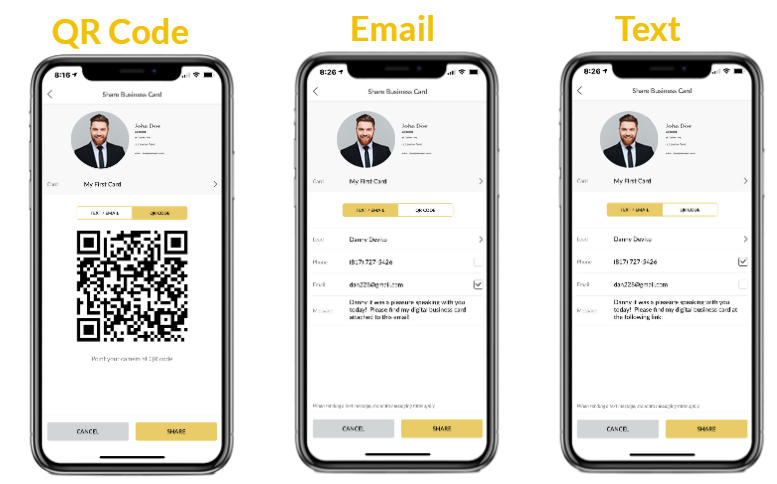
SPOTIO includes digital business cards as part of its field sales engagement platform. Your team gets admin-created cards that share via QR code, link, or text—then every card exchange logs as a location-verified activity and syncs to your CRM through real-time, bi-directional integration with native connectors.
The benefit for field sales leaders: your reps aren’t juggling separate apps for cards, routes, activities, and pipeline. They plan their day in SPOTIO, log field interactions with one tap, share their digital card at every stop, and get pinged when prospects engage—all in the same platform.
Digital business cards are a small but important part of SPOTIO—they work best when they’re plugged into the same place your team plans routes, manages territories, and tracks activities. If you already have a field sales platform and only need a standalone card app, one of the tools above is likely a better fit.
Field teams using SPOTIO report significant productivity gains because they spend less time on admin work and more time in front of prospects. Digital business cards are one piece of that workflow—integrated with territory management, lead tracking, and guided follow-up sequences through AutoPlays.
See how SPOTIO’s integrated approach accelerates your field sales process. Book a demo to see how digital business cards work alongside route optimization, CRM sync, and activity tracking—no app-switching required.