
Paper business cards were built for conferences and desk drawers—not for reps running 8–10+ stops a day in the field. They get lost, tossed, or never make it into your CRM, which means great conversations quietly disappear.
SPOTIO’s digital business cards give reps a fast, modern way to share their contact info and log a real activity in the same place they manage routes, territories, and follow‑ups. When a rep sends a card, they’re also creating a trackable touch your managers can see.
This guide walks through what digital business cards are, why they work better for field teams, and how to create and share them inside SPOTIO.
What is a Digital Business Card?
Digital business cards (DBCs) are modern versions of traditional cards that live on your phone instead of in a box on your desk. They include the same key details—your name, company, role, and contact info—but they’re stored and shared digitally.
With SPOTIO, your digital business card isn’t just a static file. It’s connected to your leads, activities, and communication history, so every card you send becomes part of your pipeline instead of a forgotten piece of paper.
Once you’ve created your cards in SPOTIO, reps can share them in seconds, update details whenever something changes, and make sure every great conversation has a way to turn into a follow‑up.
Once you have your own digital business cards, you’ll be able to share them with prospects, automatically update them when needed, and even boost customer satisfaction.
Why Digital Business Cards Matter for Field Sales
Digital business cards are especially useful for outside sales teams who are always on the move and working out of their phones.
- Less friction at the door or event – Reps can text or email a card immediately after a conversation, or share it via QR code, so prospects don’t have to keep track of paper.
- Always accurate information – If a rep’s number, territory, or title changes, updating the card in SPOTIO updates it everywhere. No reprints or outdated cards floating around.
- More complete follow‑up – Because cards are tied to leads in SPOTIO, a simple share can create or update a contact and activity, giving managers visibility into what’s happening in the field.
- Better experience for prospects – Prospects can tap to call, email, or text directly from the card on their phone, instead of hunting through a stack of paper.
Most paper business cards end up lost or thrown away, even when the prospect is interested. Digital cards stay where people actually work—on their phones—and keep your reps top of mind when prospects are ready to talk.
How Digital Business Cards Work in SPOTIO
To make things easy, SPOTIO automatically creates a default digital business card for users with access to our Engagement bundle. That default card pulls in the rep’s name, profile picture, company, phone number, and integrated email address.
From there, reps and admins can create additional cards with different details—for example, by territory, product line, or role—so they always share the version that matches the conversation they’re having.
Watch the quick video walkthrough below, then scroll down for step‑by‑step instructions on how to create your own cards.
How to Create a Digital Business Card in 5 Steps
1. Log in to the SPOTIO mobile app
Open the SPOTIO app on your mobile device and sign in with your usual credentials.
2. Go to the Business Cards settings
Tap the Gear icon in the top left corner to open Settings, then tap the Business Cards section. This is where you’ll see your default card and any additional cards you create.
3. Create a new digital business card
Tap the + icon in the top right corner of the Business Cards page to create a new card. You’ll land on the New Card screen where you can set up the details for this card.
4. Add your card details
Fill in the fields you want to show on the card, such as:
- First name and last name
- Phone number
- Email address
- Title and headline
- Profile or brand image
Your card must include at least a phone number or email address in order to be saved.
5. Save your card
When you’re done, tap Save at the bottom of the screen. You’ll return to the Business Cards list, where you can see and select your new custom card. For more information, refer to our Knowledge Base article: How to Create Digital Business Cards.
Many teams create multiple cards—for example, one for residential prospects and one for commercial accounts, or one per territory—so reps can share the most relevant information in each situation.
How to Share a SPOTIO Digital Business Card
Digital business cards only help if reps actually use them during conversations. SPOTIO makes sharing fast so reps can stay focused on the interaction, not the process.
Share With Prospects
- From the Business Cards screen, tap the card you want to share.
- Tap the Share button at the bottom of the screen.
- In the Share Business Card view, choose the Lead you want to associate with this share, or create a new one.
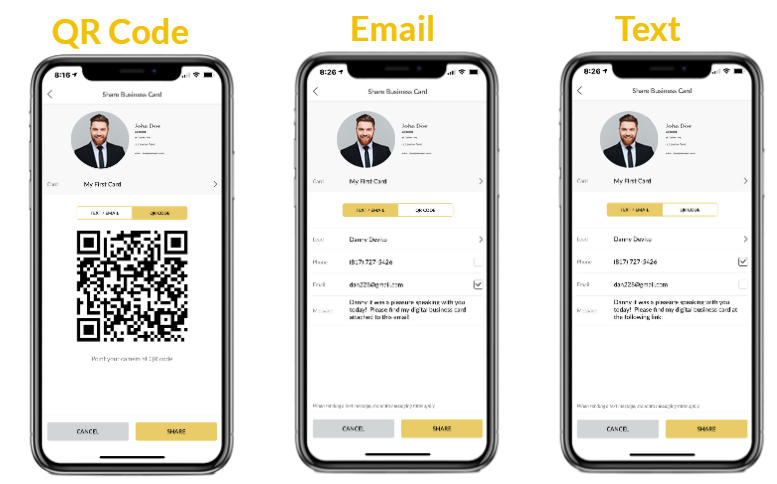
- Select how you want to send it: text, email, or QR code.
This way, every card share can be tied back to a specific lead and activity in SPOTIO, giving you better visibility into rep conversations and follow‑ups.
Other Ways to Share Cards
Cards can be shared internally within teams. For example, if you use a setter–closer model, setters can share the closer’s digital business card with a prospect. Cards can also be added to Autoplays and sent to a prospect with a follow-up email or text.
For more tips and screenshots, reference our Knowledge Base article, Sharing Digital Business Cards.
Make More Sales With SPOTIO’s Digital Business Cards
Make More Sales With SPOTIO’s Digital Business Cards
SPOTIO’s digital business cards are:
- Easy to set up – Default cards are created automatically for Pro and Business users, and additional cards only take a few taps.
- Simple to share – Reps can send cards via text, email, or QR code from the same app they use for prospecting and routing.
- Always up to date – Update contact details once and every future share reflects the changes.
For field sales teams, the real benefit is that every card share can double as a logged activity and a more complete lead record, so you’re not guessing what happened in the field.
If you’re already using SPOTIO, you can start creating and sharing digital business cards today from the mobile app. If you’re still evaluating tools, a quick demo will show you how digital cards fit alongside prospecting, routing, and territory management in one platform.
Still comparing digital business card options?
See how SPOTIO stacks up against standalone apps in our guide to the best digital business card tools for field sales teams.